EducationSoftwareStrategy.com
StrategyCommunity

Knowledge Base

Product

Community

Knowledge Base

TopicsBrowse ArticlesDeveloper Zone

Product

Download SoftwareProduct DocumentationSecurity Hub

Education

Tutorial VideosSolution GalleryEducation courses

Community

GuidelinesGrandmastersEvents
x_social-icon_white.svglinkedin_social-icon_white.svg
Strategy logoCommunity

© Strategy Inc. All Rights Reserved.

LegalTerms of UsePrivacy Policy
  1. Home
  2. Topics

KB237469: How to define a Metric using text based value prompt in MicroStrategy?


Community Admin

• Strategy


How to define a Metric using text based value prompt in MicroStrategy?

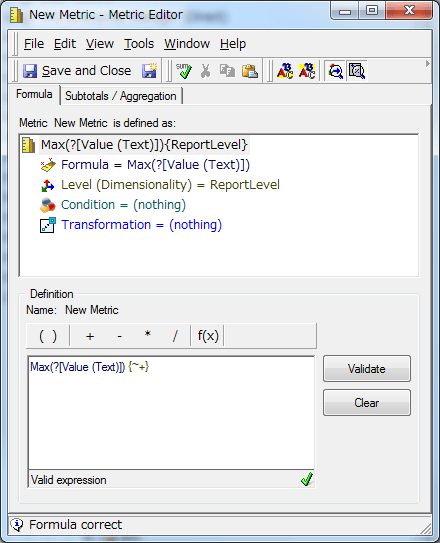
Unlike Value prompts with type of Numeric, in a Text prompt, it is not possible to drag and drop to the Metric Definition pane.
To define a Metric using a text based value prompt, directly type the prompt name with the syntax “?[Text Prompt name]”, for example Max(?[Value (Text)]) and click Validate.
 

ka04W000000uGCcQAM_0EM440000002C7P.jpeg

KB237469


Comment

0 comments

Details

Knowledge Article

Published:

June 9, 2017

Last Updated:

October 16, 2018