Strategy 10 introduces a new option on Intelligent Cubes called Data Partition, that is available from Intelligent Cube editor > Data > Configure Intelligent Cube… > Data Partition as shown below:
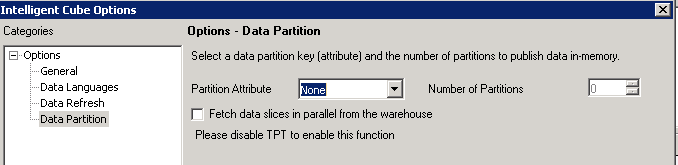
Partition attribute can be any attribute from the the Intelligent Cube attribute. It is possible to add a partitioning attribute on any Intelligent Cube and the usage is just not restircted to Intelligent Cubes created through Data Import The number of partitions should be less than or equal to the number of processors on the machine.
Primarily, partitioned Intelligent Cubes are built through the Data Import feature using Strategy PRIME. Refer to the following Strategy Knowledge Base document for more information on choosing a partition attribute:
KB221859: PRIME partitioning guidelines for MicroStrategy 10
With partitioned enabled, the cube size is expected to be slightly larger than a non-partitioned cube. Partitions help in performance improvement of subset report executions; as a trade-off, some extra information is written in the cube, resulting in an increase in the cube size.
Create and publish Intelligent Cube with attribute ‘Category’ and metric ‘Revenue’; with more partitions created, the cube size increases linearly.

However, the cube monitor doesn’t show partition related information. Only one cube file will be generated for each Intelligent cube on disk.
Refer to Strategy Product Manual 'In-memory Analytics Guide' for more details about partitioning and Strategy PRIME.
Article Reference Number:
KB237803
