EducationSoftwareStrategy.com
StrategyCommunity

Knowledge Base

Product

Community

Knowledge Base

TopicsBrowse ArticlesDeveloper Zone

Product

Download SoftwareProduct DocumentationSecurity Hub

Education

Tutorial VideosSolution GalleryEducation courses

Community

GuidelinesGrandmastersEvents
x_social-icon_white.svglinkedin_social-icon_white.svg
Strategy logoCommunity

© Strategy Inc. All Rights Reserved.

LegalTerms of UsePrivacy Policy
  1. Home
  2. Topics

KB240031: Text box in a panel shows incorrect value when 50,000,000 is input in transaction services in MicroStrategy Mobile 9.5 iOS for iPad and iPhone


Community Admin

• Strategy


This document shows one known issue that text box in a panel shows incorrect value when 50,000,000 is input in transaction services in MicroStrategy Mobile 9.5. MicroStrategy will continue to investigate and post updates as soon as they are available

SUMMARY:
This document shows one known issue that text box in a panel shows incorrect value when 50,000,000 is input in transaction services in Strategy Mobile 9.5.
 
SYMPTOM:
Text box in a panel shows incorrect value when 50,000,000 is input in transaction services in Strategy Mobile 9.5 iOS for iPad and iPhone. 
 
STEPS TO REPRODUCE:

  • In Strategy Tutorial warehouse, create test table with script below:
    
    Create table Jimmy1 (A1 int, M1 int);
    Insert into Jimmy1 values (1,100);

  • Import the table into Strategy Tutorial project in Warehouse Catalog and create attribute A1 mapping to column A1, and fact M1 mapping to column M1. Create metric M1 with fact M1. Update schema.
  • Create onedataset with attribute A1 and metric M1. Create transaction report with Script below:
    
    update Jimmy1 set M1=Input1
    where A1=Input2

     
ka04W000000OaXUQA0_0EM4400000029yV.jpeg
  • Create one document with this dataset. Drag the metric and attribute as text to the document and insert one panel stack. Drag the metric and attribute as text to the panel as shown below:
ka04W000000OaXUQA0_0EM4400000029yW.jpeg
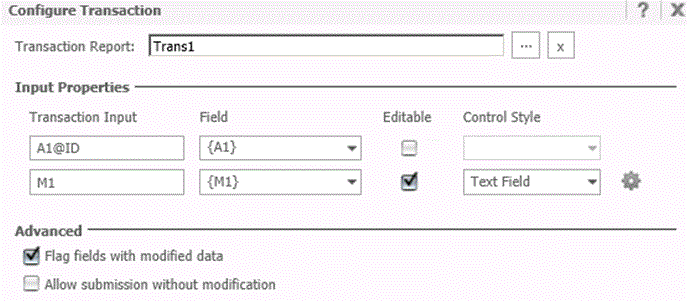
  • Right Click on the text in the panel to configure transaction. Map Input1 to M1 and Input2 to A1 as shown below:
ka04W000000OaXUQA0_0EM4400000029yY.jpeg
  • Run the document in Mobile 9.5 as shown below:
ka04W000000OaXUQA0_0EM4400000029yR.jpeg
  • Enter 50,000,000 into the text field in the panel and click on Submit. The document will display incorrect data in the panel as below:
ka04W000000OaXUQA0_0EM4400000029ya.jpeg


CAUSE:
This is a known issue in Strategy Mobile 9.5.
 
NOTE: This behavior was found to be specific to the value 50,000,000. Additionally, this is only a display issue as the value submitted via the transaction into the database was found to be accurate. 
 
ACTION:
Strategy will continue to investigate and post updates as soon as they are available.
KB240031


Comment

0 comments

Details

Knowledge Article

Published:

May 22, 2017

Last Updated:

December 30, 2018