EducationSoftwareStrategy.com
StrategyCommunity

Knowledge Base

Product

Community

Knowledge Base

TopicsBrowse ArticlesDeveloper Zone

Product

Download SoftwareProduct DocumentationSecurity Hub

Education

Tutorial VideosSolution GalleryEducation courses

Community

GuidelinesGrandmastersEvents
x_social-icon_white.svglinkedin_social-icon_white.svg
Strategy logoCommunity

© Strategy Inc. All Rights Reserved.

LegalTerms of UsePrivacy Policy
  1. Home
  2. Topics

KB240262: Duplicate prompt is displayed in a prompt index page after re-prompting a report which contains object prompts in MicroStrategy 9.4.x


Stefan Zepeda

Salesforce Solutions Architect • Strategy


Duplicate prompt is displayed in a prompt index page after re-prompting a report which contains object prompts in MicroStrategy 9.4.

SYMPTOM:
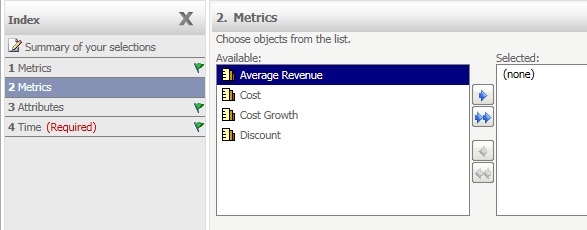
  In Strategy 9.4.x, duplicate prompts are displayed in a prompt index page after re-prompting a report which contains object prompts as shown in the image below:
ka02R000000kZjuQAE_0EM440000002C65.jpeg


STEPS TO REPRODUCE:
Follow the steps below to reproduce the issue with the Strategy Tutorial project:
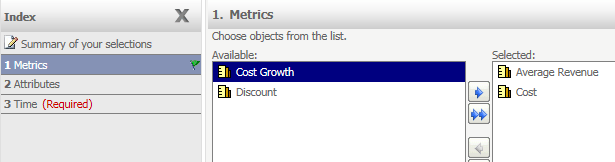
  1. Create an object prompt which contains the metrics.
  2. Create an object prompt which contains the attributes.
  3. Create a hierarchy prompt.
  4. Create a report as follows:
    Row - Year attribute
    Report Object - Two object prompts.
    Local filter - Hierarchy prompt.


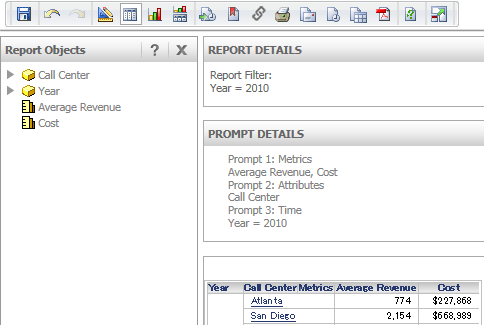
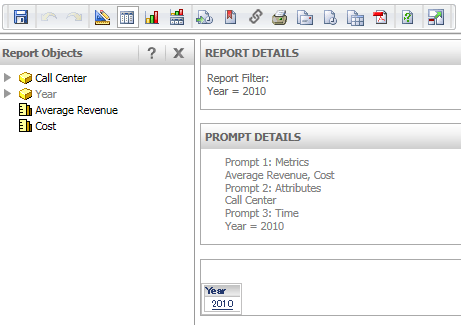
  • Run the report and the prompt index page is displayed correctly.
ka02R000000kZjuQAE_0EM440000002C5v.jpeg
  • The selected objects are displayed in the Report Objects pane correctly.
ka02R000000kZjuQAE_0EM440000002C5s.jpeg
  • Move the attributes and metrics in the Report Object pane to the grid template.
ka02R000000kZjuQAE_0EM440000002C5u.jpeg


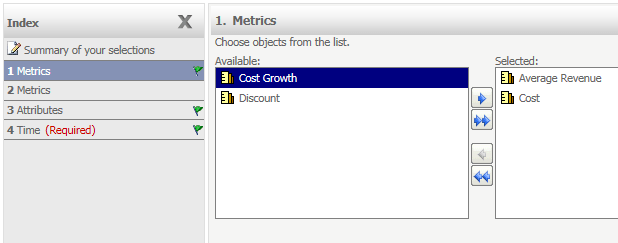
  • Re-prompt the report. Note that the duplicate of the object prompt for the metric selection is displayed in the prompt index page:
ka02R000000kZjuQAE_0EM440000002C6B.jpeg
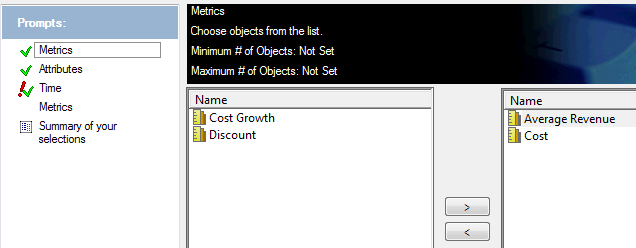
  • The issue is seen in Strategy Developer as well:
ka02R000000kZjuQAE_0EM440000002C69.jpeg

CAUSE:
This is a known issue with Strategy 9.4.x.
 
ACTION:
Currently this issue is being reviewed by Strategy for a potential code fix on an upcoming Strategy release.
The Strategy Internal Reference Number for the issue discussed in this technical note is 1014563.


Comment

0 comments

Details

Knowledge Article

Published:

June 8, 2017

Last Updated:

June 8, 2017