EducationSoftwareStrategy.com
StrategyCommunity

Knowledge Base

Product

Community

Knowledge Base

TopicsBrowse ArticlesDeveloper Zone

Product

Download SoftwareProduct DocumentationSecurity Hub

Education

Tutorial VideosSolution GalleryEducation courses

Community

GuidelinesGrandmastersEvents
x_social-icon_white.svglinkedin_social-icon_white.svg
Strategy logoCommunity

© Strategy Inc. All Rights Reserved.

LegalTerms of UsePrivacy Policy
  1. Home
  2. Topics

KB240392: "Disable the built-in PDF viewer" option in mobile configuration does not work as expected in MicroStrategy Mobile 9.5 iOS for iPad and iPhone


Community Admin

• Strategy


This document shows one known issue that the "Disable the built-in PDF viewer" option doesn't work in MicroStrategy Mobile 9.5 iOS for iPad and iPhone. MicroStrategy will continue to investigate and post updates as soon as they are available.

SUMMARY:
This document shows one known issue that the "Disable the built-in PDF viewer" option doesn't work in Strategy Mobile 9.5 iOS for iPad and iPhone. Please contact Strategy Technical Support for the latest update on this issue.
 
SYMPTOM:
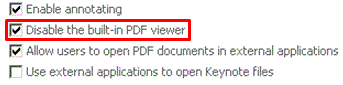
"Disable the built-in PDF viewer" option in mobile configuration doesn't work in Strategy Mobile 9.5 iOS for iPad and iPhone. 
 
STEPS TO REPRODUCE:
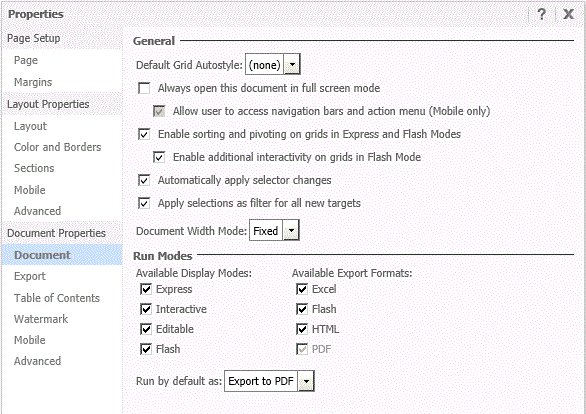
  • Create one document, Set "Run by default" to "Export to PDF" as shown below:
ka04W000000OhPpQAK_0EM4400000029yI.jpeg
  • Check "Disable the built-in PDF viewer" option in mobile configuration as shown below:
ka04W000000OhPpQAK_0EM4400000029yK.jpeg
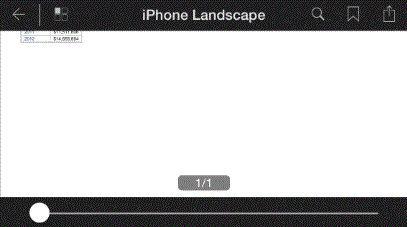
  • Run the document in mobile device. The document is opened by the built-inPDF viewer as shown below:
ka04W000000OhPpQAK_0EM4400000029yO.jpeg

 
CAUSE:
This is a known issue in Strategy Mobile 9.5 iOS for iPad and iPhone.
 
ACTION:
Strategy will continue to investigate and post updates as soon as they are available.


Comment

0 comments

Details

Knowledge Article

Published:

May 22, 2017

Last Updated:

May 22, 2017