Summary
The following screenshot illustrates a report with an attribute in the page-by section:
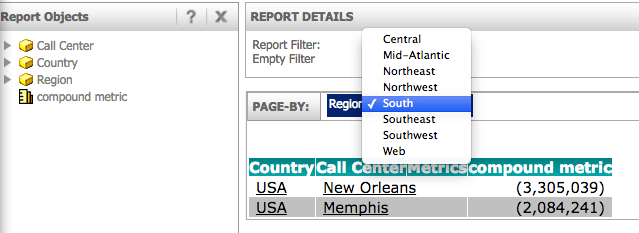
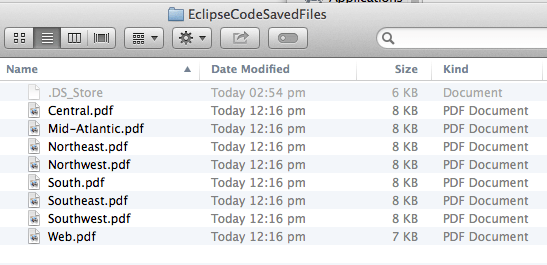
It is possible to execute this report in Java code, loop through the individual elements in the page-by, and generate a PDF export for each page-by element.
Java Code
public static void reportExpandPagebys(){
		getSession();

		// TN 35132 for getSession info. This prepares a WebIServerSession and stores it in serverSession.
		// serverSession
		WebReportSource reportSource = serverSession.getFactory().getReportSource();
		WebReportInstance reportI = null;

		// Get page-by report in instance using reportID.
		try {
			reportI = reportSource.getNewInstance("9CDBFE72475CAAA513E927A144407EAE");

			// Set execution mode to PDF
			reportI.setExecutionMode(EnumWebReportExecutionModes.REPORT_MODE_PDF);

			//Wait for report to finish executing.
			while (reportI.pollStatus() != 1) Thread.sleep(2000);

			//Get web report data - needed to get grid
			WebReportData wrd = null;
			wrd = reportI.getResults();

			// Get report grid, needed to get page-by values
			WebReportGrid wrg = null;
			wrg = wrd.getWebReportGrid();

			// Retrieve first page-by in grid
			WebGridHeaders pageByWebGridHeaders = wrg.getPageHeaders();
			WebHeaders pageByWebHeaders = pageByWebGridHeaders.get(0);

			// List of page-by values for this page-by option is stored in pageByWebHeaders. Cycle through this to get individual options
			for (int i = 0; i < pageByWebHeaders.size(); i++){
				WebHeader pageByWebHeader = pageByWebHeaders.get(i);

				/*
				// list all possible values, ID and name
				if(pageByWebHeader.isCurrentElement()){
					l("------------ Current page-by 0 header");
					l("Name: "+pageByWebHeader.getDisplayName());
					//l("Name2: "+pageByWebHeader.getWebElement().getDisplayName());
					l("ID: "+pageByWebHeader.getWebElement().getElementID());
				}
				else{
					l("------------ Not selected: ");
					l("Name: "+pageByWebHeader.getDisplayName());
					//l("Name2: "+pageByWebHeader.getWebElement().getDisplayName());
					l("ID: "+pageByWebHeader.getWebElement().getElementID());
				}//*/

				// set page-by, get PDF data, and save to file for each element.
				exportReportWithPageby(reportI, pageByWebHeader.getWebElement().getElementID(), pageByWebHeader.getWebElement().getDisplayName());
			}

		} catch (WebObjectsException e) {
			e.printStackTrace();
		} catch (InterruptedException e) {
			e.printStackTrace();
		}

		closeSession(serverSession);
	}

	public static void exportReportWithPageby(WebReportInstance ri, String elementID, String filename){
		try {
			WebReportManipulation wrm = ri.getReportManipulator();
			WebReportInstance newInst = null;

			wrm.setCurrentPageByElement(elementID, EnumDSSXMLCurrentElementStatus.DssXmlCurrentElementChosen, true);

			newInst = wrm.applyChanges();

			// only exporting current page-by setting, not all pages
			WebReportExportSettings expSet = newInst.getExportSettings();
			expSet.setMode(EnumWebReportExportModes.CURRENT_PAGE);

			// Trigger report execution and wait for it to finish
			while (newInst.pollStatus() != 1) Thread.sleep(2000);

			// When execution is finished, get PDF data
			byte[] data;
			data = newInst.getPDFData();

			// Save byte array to file
			save(data,filename);

		} catch (WebObjectsException e) {
			e.printStackTrace();
		} catch (WebReportValidationException e) {
			e.printStackTrace();
		} catch (InterruptedException e) {
			e.printStackTrace();
		} catch (Exception e) {
			e.printStackTrace();
		}

	}

	private static void save(byte[] data, String fileName) throws Exception {
		FileOutputStream fos = new FileOutputStream("/Users/tsiebler/Documents/EclipseCodeSavedFiles/" + fileName + ".pdf");
		fos.write(data);
		fos.close();
	}
The example provided in this document is provided “as-is” and user has read the following customization warning:
ADDITIONAL INFORMATION:
The Strategy SDK allows you to customize several Strategy products and extend and integrate the Strategy business intelligence functionality into other applications. However, before changing the way Strategy products look or behave, it is helpful to understand how the application is built. For more information regarding the Strategy products or the process of customizing Strategy products, please refer to Strategy Developer Zone (https://developer.Strategy.com).
To access the Strategy Developer Zone, you must have access to the Strategy Knowledge Base, you must have purchased the Strategy SDK, and you must be current on your Strategy maintenance agreement. If you are a US-based business and believe that you satisfy all three of these conditions but you do not have access to the Strategy Developer Zone, please contact Strategy Technical Support at support@Strategy.com or at (703) 848-8700. If you are an international business, please contact Strategy Technical Support at the appropriate email address or phone number found at https://www.Strategy.com/us/services/support/contact.
CUSTOMIZATION WARNING:
This customization is provided as a convenience to Strategy users and is only directly applicable to the version stated. While this code may apply to other releases directly, Strategy Technical Support makes no guarantees that the code provided will apply to any future or previous builds. In the event of a code change in future builds, Strategy Technical Support makes no guarantee that an updated version of this particular customization will be provided. In the event of a code change in future builds, Strategy may not be able to provide additional code on this matter even though this customization is provided at this time for this specific build. For enhancements to this customization or to incorporate similar functionality into other versions, contact your Account Executive to inquire about Strategy Consulting assistance.
