SYMPTOM
Strategy Intelligence Server nodes in a cluster become unresponsive when one of the nodes is doing report cache, document cache or Intelligent Cube related activity. The unresponsiveness results in significant performance degradation and users notice significant slowdown in execution of jobs.
This behavior is prominent when the number of caches are in thousands, multiple projects are loaded and with the environment having high number of clustered nodes.
The Strategy Intelligence Server unresponsiveness is most prominent during server startup, cluster maintenance or cache synchronization.
CAUSE
The Intelligence Server unresponsiveness in the cluster can be attributed to the number of threads used for cache synchronization. In 9.4.x versions, by default only one thread is used for synchronizing caches (Report/Document/Cube) between nodes in a cluster and for many other cluster related actions, including login. When the number of caches and projects to be synchronized becomes large, the Strategy Intelligence Server may become unresponsive. When synchronization is slow, it slows down all the other cluster related activity.
ACTION
In Strategy Intelligence Server 9.4.x, the default behavior can be changed by having 3 threads per project per node. Three different threads will be used for synchronizing report caches, document caches and cube caches within a project on a node. The total number of threads that will be available equals – Number of Projects * Number of Clustered Nodes * 3. For example, in a 4 node cluster with 20 projects, we would have 20*4*3 = 240 threads for synchronization of caches across the cluster as compared to default value of 1 thread. Cache synchronization across the cluster becomes faster by increasing the number of threads. In most cases, faster cache synchronization leads to faster Intelligence Server responsiveness and better performance.
In the solution, we spawn new threads to specifically do the synchronization. Therefore, it would not cause other actions to hang even though synchronization were to take a long time.
Note: Enabling this setting will have more working threads and overhead due to context switches.
By default, the “UseClusterSynchThread” setting is disabled in Strategy 9.4.x. Without this entry or if its value is 0, the old way of cluster synchronization is used. The default behavior can be changed by enabling the “UseClusterSynchThread” setting in the Windows registry or in Intelligence Server Registry file (MSIReg.reg).
Linux
The setting can be enabled by adding the following entry to the registry file (MSIReg.reg file found in the home folder of the Strategy installation) on all Strategy Intelligence Server installations and restarting all the Intelligence Servers in the cluster.
[HKEY_LOCAL_MACHINE\SOFTWARE\MicroStrategy\DSS Server\Castor]
 "HomePath"="/build/9.4.1010.0103/RELEASE/BIN/Linux"
 "IgnoreAllExceptions"=dword:00000000
 "ProcessAffinity"=""
 "UseClusterSynchThread"=dword:00000001
HKEY_LOCAL_MACHINE\SOFTWARE\Wow6432Node\MicroStrategy\DSS Server\Castor
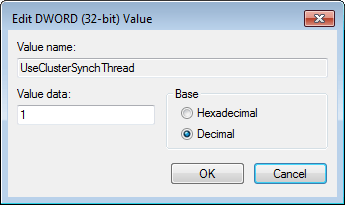
After enabling this setting, the Intelligence Server will have one thread per node, per project and per synchronization type (3 types – report cache/document cache/cube cache) and the synchronization process will be parallel.
The Strategy Internal Reference Number for the issue discussed in this technical note is 861229.
