SUMMARY
This article discusses an issue where Narrowcast Excel attachments opened on a mobile device are compressed and not readable.
SYMPTOM
When sending a Strategy Narrowcast Server Document as an Excel attachment to email, if it is opened from a mobile device, the contents are compressed and not readable, as shown:

STEPS TO REPRODUCE
1) Create a simple report in Tutorial.
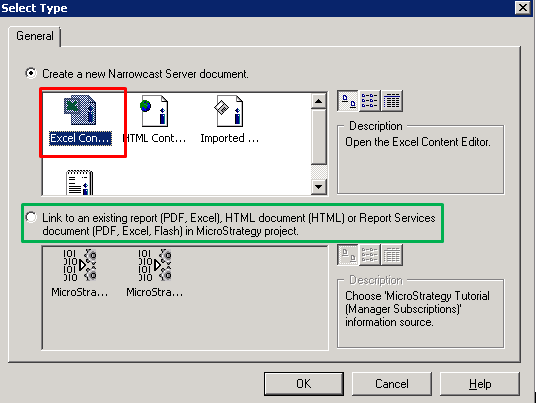
2) Create an email service in Narrowcast and add a attachment using "Create a new Narrowcast Server document" and selecting "Excel Content".

3) Run the service and open the email from an iPad or Android device.
4) Using a 3rd party Office Excel viewer such as "OfficeSuite", "Office Mobile", "Polaris Office", etc. open the Excel file. It will appear smashed or compressed.

CAUSE
This is a known issue in Strategy Narrowcast Server 9.4.x. The issue has to do with the way the Narrowcast Server Document formats Excel files.
ACTION
Please contact Strategy Technical Support for an update on this issue.
WORKAROUND
This issue only occurs for Narrowcast Server Excel Documents. This can be worked around by altering the contents of the service to be a “Linked Report” instead.
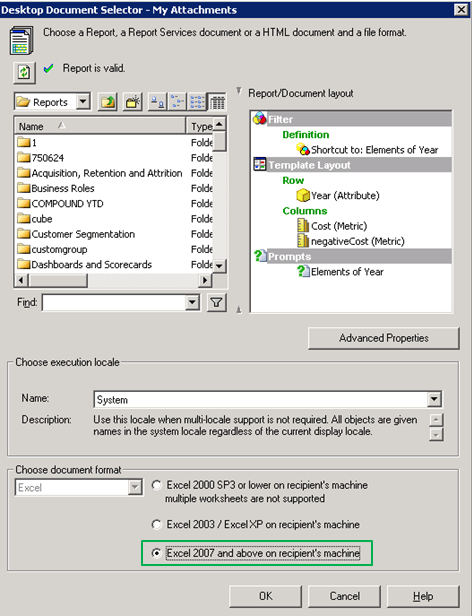
In addition to using a “Linked report”, ensure the report is set to use “Excel 2007 and above” as the Excel document format.
This issue is being tracked by internal reference number 1015246.
