EducationSoftwareStrategy.com
StrategyCommunity

Knowledge Base

Product

Community

Knowledge Base

TopicsBrowse ArticlesDeveloper Zone

Product

Download SoftwareProduct DocumentationSecurity Hub

Education

Tutorial VideosSolution GalleryEducation courses

Community

GuidelinesGrandmastersEvents
x_social-icon_white.svglinkedin_social-icon_white.svg
Strategy logoCommunity

© Strategy Inc. All Rights Reserved.

LegalTerms of UsePrivacy Policy
  1. Home
  2. Topics

KB241130: Users are unable to update license key on License Manager in MicroStrategy 10


Community Admin

• Strategy


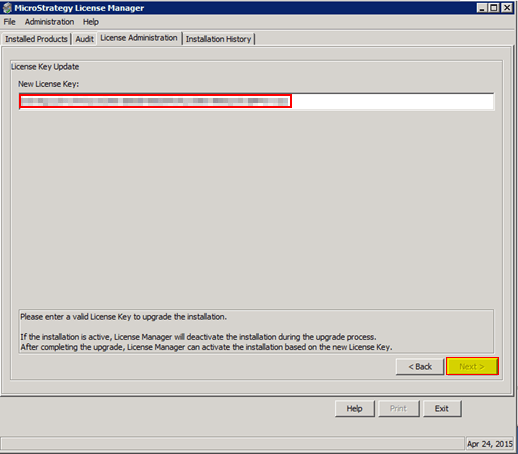
When users attempt to update the license key on MicroStrategy License Manager, the “next” button is greyed out and it is not possible to click on other buttons or go to other tabs

SYMPTOM
When users attempt to update the license key on Strategy License Manager, the “next” button is greyed out and it is not possible to click on other buttons or go to other tabs.
ka04W000000OaXGQA0_0EM4400000029Ew.jpeg

 
CAUSE
A License Manager related library has been updated (“MAInTls3 JNI bridge”) in this release, but this library did not get re-generated for 64-bit Windows operating system during the compilation. A key function is missing which results in the error/hang.
 
WORKAROUND
Use console mode “java -jar MALicMgr.jar –console” to perform the license key update.
 
 
KB241130


Comment

0 comments

Details

Knowledge Article

Published:

April 1, 2017

Last Updated:

December 28, 2018