EducationSoftwareStrategy.com
StrategyCommunity

Knowledge Base

Product

Community

Knowledge Base

TopicsBrowse ArticlesDeveloper Zone

Product

Download SoftwareProduct DocumentationSecurity Hub

Education

Tutorial VideosSolution GalleryEducation courses

Community

GuidelinesGrandmastersEvents
x_social-icon_white.svglinkedin_social-icon_white.svg
Strategy logoCommunity

© Strategy Inc. All Rights Reserved.

LegalTerms of UsePrivacy Policy
  1. Home
  2. Topics

KB242203: Unable to activate MicroStrategy Analytics Enterprise 9.5.1 for Windows


Community Admin

• Strategy


Unable to activate MicroStrategy Analytics Enterprise 9.5.1 for Windows

SYMPTOM
It is not possible to activate the Strategy product suite via Strategy License Manager in Strategy Analytics Enterprise 9.5.1.
STEPS TO REPRODUCE
This is a Windows specific issue:

  • Open License Manager on a Windows operating system on Strategy Analytics Enterprise 9.5.1.
  • On the "License Administrator" tab, choose “Activate Server Installation”.
  • Fill all the information as needed.
  • After clicking on “next”, License Manager will hang on "Please wait", as shown below.
ka04W000000OaWdQAK_0EM4400000029Eu.jpeg


WORKAROUND
The product can be activated by doing the following:
1) Start a DOS CMD Line window as Administrator (right-click on Command Prompt
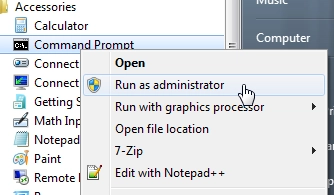
ka04W000000OaWdQAK_0EM4400000029Er.jpeg

2) Navigate to the License Manager JAR file (by default found in C:\Program Files (x86)\Common Files\Strategy) and run it as follows:


java -jar MALicMgr.jar –console

If the above command fails, It is also possible to execute the License Manager directly with the following command:

MALicMgr.exe -console

 
3) Follow the on-screen instructions to activate the installation.


KB242203


Comment

0 comments

Details

Knowledge Article

Published:

May 1, 2017

Last Updated:

December 28, 2018