EducationSoftwareStrategy.com
StrategyCommunity

Knowledge Base

Product

Community

Knowledge Base

TopicsBrowse ArticlesDeveloper Zone

Product

Download SoftwareProduct DocumentationSecurity Hub

Education

Tutorial VideosSolution GalleryEducation courses

Community

GuidelinesGrandmastersEvents
x_social-icon_white.svglinkedin_social-icon_white.svg
Strategy logoCommunity

© Strategy Inc. All Rights Reserved.

LegalTerms of UsePrivacy Policy
  1. Home
  2. Topics

KB242523: New feature in MicroStrategy Web 10: Sorting elements on List input controls on Transaction Services documents


Community Admin

• Strategy


New feature in MicroStrategy Web 10: Sorting elements on List input controls on Transaction Services documents

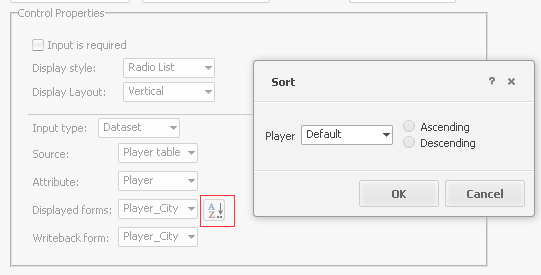
Starting in Strategy Web 10, transaction input controls now have the functionality to obey the pre-defined report sort order of attributes, and to obey the custom sort specifed on an attribute form via the new Sort dialogue, like shown below:
 

ka04W000000OaRgQAK_0EM4400000025gq.jpeg

 
When the sort behavior is set to Default, the transaction input control will obey the pre-defined sort criteria in the attribute. In some cases, this new behavior may result in a different element order between Strategy 10 and previous versions.
To understand the difference caused by this feature between Strategy Web 10 and previous versions, consider the following example where the source table for the List input control looks like this and displays the Player_City form:
 

50
Player_IDPlayer_DESCPlayer_City1JackMiami2JohnBoston3SaraAnnapolis4DougCleveland5JuliaWashington6EmilyPortland7SamDenver

50
Player_IDPlayer_DESCPlayer_City1JackMiami2JohnBoston3SaraAnnapolis4DougCleveland5JuliaWashington6EmilyPortland7SamDenver

50
Player_IDPlayer_DESCPlayer_City1JackMiami2JohnBoston3SaraAnnapolis4DougCleveland5JuliaWashington6EmilyPortland7SamDenver

50
Player_IDPlayer_DESCPlayer_City1JackMiami2JohnBoston3SaraAnnapolis4DougCleveland5JuliaWashington6EmilyPortland7SamDenver

50
Player_IDPlayer_DESCPlayer_City1JackMiami2JohnBoston3SaraAnnapolis4DougCleveland5JuliaWashington6EmilyPortland7SamDenver

50
Player_IDPlayer_DESCPlayer_City1JackMiami2JohnBoston3SaraAnnapolis4DougCleveland5JuliaWashington6EmilyPortland7SamDenver

50
Player_IDPlayer_DESCPlayer_City1JackMiami2JohnBoston3SaraAnnapolis4DougCleveland5JuliaWashington6EmilyPortland7SamDenver

50
Player_IDPlayer_DESCPlayer_City1JackMiami2JohnBoston3SaraAnnapolis4DougCleveland5JuliaWashington6EmilyPortland7SamDenver

50
Player_IDPlayer_DESCPlayer_City1JackMiami2JohnBoston3SaraAnnapolis4DougCleveland5JuliaWashington6EmilyPortland7SamDenver

50
Player_IDPlayer_DESCPlayer_City1JackMiami2JohnBoston3SaraAnnapolis4DougCleveland5JuliaWashington6EmilyPortland7SamDenver

50
Player_IDPlayer_DESCPlayer_City1JackMiami2JohnBoston3SaraAnnapolis4DougCleveland5JuliaWashington6EmilyPortland7SamDenver

50
Player_IDPlayer_DESCPlayer_City1JackMiami2JohnBoston3SaraAnnapolis4DougCleveland5JuliaWashington6EmilyPortland7SamDenver

50
Player_IDPlayer_DESCPlayer_City1JackMiami2JohnBoston3SaraAnnapolis4DougCleveland5JuliaWashington6EmilyPortland7SamDenver

50
Player_IDPlayer_DESCPlayer_City1JackMiami2JohnBoston3SaraAnnapolis4DougCleveland5JuliaWashington6EmilyPortland7SamDenver

50
Player_IDPlayer_DESCPlayer_City1JackMiami2JohnBoston3SaraAnnapolis4DougCleveland5JuliaWashington6EmilyPortland7SamDenver

50
Player_IDPlayer_DESCPlayer_City1JackMiami2JohnBoston3SaraAnnapolis4DougCleveland5JuliaWashington6EmilyPortland7SamDenver

50
Player_IDPlayer_DESCPlayer_City1JackMiami2JohnBoston3SaraAnnapolis4DougCleveland5JuliaWashington6EmilyPortland7SamDenver

50
Player_IDPlayer_DESCPlayer_City1JackMiami2JohnBoston3SaraAnnapolis4DougCleveland5JuliaWashington6EmilyPortland7SamDenver

50
Player_IDPlayer_DESCPlayer_City1JackMiami2JohnBoston3SaraAnnapolis4DougCleveland5JuliaWashington6EmilyPortland7SamDenver

50
Player_IDPlayer_DESCPlayer_City1JackMiami2JohnBoston3SaraAnnapolis4DougCleveland5JuliaWashington6EmilyPortland7SamDenver

50
Player_IDPlayer_DESCPlayer_City1JackMiami2JohnBoston3SaraAnnapolis4DougCleveland5JuliaWashington6EmilyPortland7SamDenver

50
Player_IDPlayer_DESCPlayer_City1JackMiami2JohnBoston3SaraAnnapolis4DougCleveland5JuliaWashington6EmilyPortland7SamDenver

50
Player_IDPlayer_DESCPlayer_City1JackMiami2JohnBoston3SaraAnnapolis4DougCleveland5JuliaWashington6EmilyPortland7SamDenver

50
Player_IDPlayer_DESCPlayer_City1JackMiami2JohnBoston3SaraAnnapolis4DougCleveland5JuliaWashington6EmilyPortland7SamDenver

 
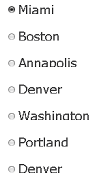
In previous Strategy versions, the elements as they appeared in the List are ordered to show as:
 

ka04W000000OaRgQAK_0EM4400000025gr.jpeg

 
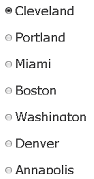
While in Strategy 10, the elements will be ordered to show as:
 

ka04W000000OaRgQAK_0EM4400000025gp.jpeg

 
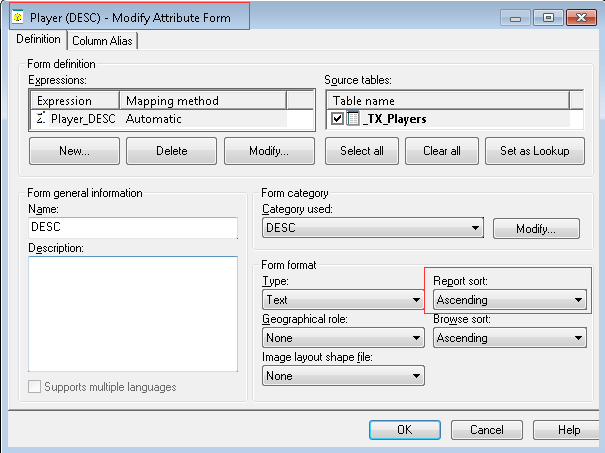
This is because prior to Strategy 10, transaction services did not support sorting on transaction input control elements. Instead, element order was always determined by attribute ID. Starting in Strategy 10, the element order will obey the pre-defined attribute sort order by default. The pre-defined sort definition can be observed when opening the attribute editor in Developer. In the example above, if the Player attribute is sorted by Player_DESC ascending...
 

ka04W000000OaRgQAK_0EM4400000025h4.jpeg

 
... then the List elements will be sorted as shown above with Cleveland at the top of the list (because Cleveland corresponds to Doug which is the first ascending Player_DESC).
Users have the option to modify this sorting behavior by explicitly setting the sort order on the List input control, like shown below:
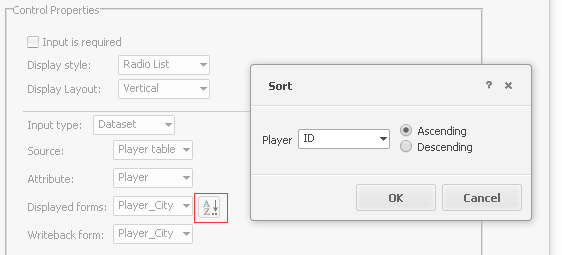
 

ka04W000000OaRgQAK_0EM4400000025gt.jpeg

 
Doing so will cause the list elements to be sorted independently of the sort order on the underyling dataset. For the example above, setting sort to be ascending by the ID form of the Player attribute results in the list being sorted the same as the pre-Strategy 10 behavior...
 

ka04W000000OaRgQAK_0EM4400000025gr.jpeg

 
... where Miami is sorted first because it corresponds to the first ascending Player_ID.
KB242523


Comment

0 comments

Details

Knowledge Article

Published:

April 14, 2017

Last Updated:

December 26, 2018