SUMMARY
This issue is specific to documents that have an incorrect setting; details of this have been provided in the document.
SYMPTOM
In Strategy 9.x, documents with large amount of data are exported partially when exported to Microsoft Excel with formatting in Strategy 9.x. For example, a document contains 30,000 records only exports a little more than 100 rows in Excel. Exporting in Flash format works correctly. All the other modes export partially.
The Intelligence Server Governing Rules under: File Generation > Maximum memory consumption for EXCEL files is set to a quite large number; Grid > properties and formatting > layout, none of the “grid overflow” is set to Clip.
Creating a new document with the same datasets does not have the issue.
CAUSE
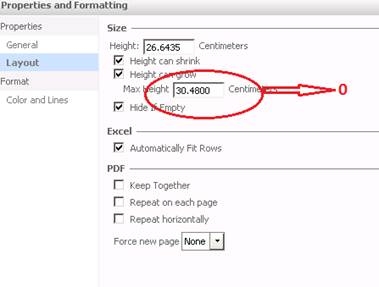
This issue is because of an incorrectly set document formatting property. To check this setting, users have to right click in the body section of the document and access the document's properties and formatting. Under the Properties >Layout section, check the ‘Max height’ and see that it is set to a specific number. By default, for a new document, it is 0 which means unlimited.
ACTION
Change the ‘Max height’ to zero as shown below:
The Strategy Internal Reference Number for the issue discussed in this technical note is 1015662.
