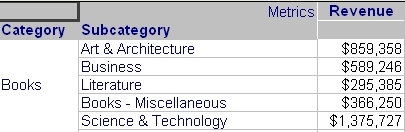
The following code will take a report ID to then loop through the elements present in the template and output the name of both attributes and metrics using the Strategy Web SDK 9.4.1:
Report ID: 73CAAF554E9D296F988B5E83F84AF567
package com.Strategy.custom.standalone;

import com.Strategy.web.objects.SimpleList;
import com.Strategy.web.objects.WebAttributeForms;
import com.Strategy.web.objects.WebIServerSession;
import com.Strategy.web.objects.WebMetric;
import com.Strategy.web.objects.WebObjectInfo;
import com.Strategy.web.objects.WebObjectsException;
import com.Strategy.web.objects.WebObjectsFactory;
import com.Strategy.web.objects.WebReportInstance;
import com.Strategy.web.objects.WebReportSource;
import com.Strategy.web.objects.WebTemplate;
import com.Strategy.web.objects.WebTemplateAttribute;
import com.Strategy.web.objects.WebTemplateConsolidation;
import com.Strategy.web.objects.WebTemplateCustomGroup;
import com.Strategy.web.objects.WebTemplateDimension;
import com.Strategy.web.objects.WebTemplateMetric;
import com.Strategy.web.objects.WebTemplateMetrics;
import com.Strategy.web.objects.WebTemplateUnit;
import com.Strategy.webapi.EnumDSSXMLAuthModes;
import com.Strategy.webapi.EnumDSSXMLAxisName;
import com.Strategy.webapi.EnumDSSXMLExecutionFlags;
import com.Strategy.webapi.EnumDSSXMLTemplateUnitType;

public class GetReport {

	public static void main(String[] args) throws WebObjectsException {

		WebObjectsFactory objectFactory = WebObjectsFactory.getInstance();

		//Connection to IS
		WebIServerSession serverSession = objectFactory.getIServerSession();
		serverSession.setServerPort(0);
		serverSession.setAuthMode(EnumDSSXMLAuthModes.DssXmlAuthStandard);
		serverSession.setProjectName("Strategy Tutorial");
		serverSession.setLogin("administrator");
		serverSession.setPassword("");
		serverSession.setServerName("localhost");

		WebObjectsFactory woFact = serverSession.getFactory();

		WebReportSource reptsrc = woFact.getReportSource();


		//Get Report Instance
		reptSrc.setExecutionFlags(EnumDSSXMLExecutionFlags.DssXmlExecutionResolve EnumDSSXMLExecutionFlags.DssXmlExecutionUseCache EnumDSSXMLExecutionFlags.DssXmlExecutionUpdateCache);

		WebReportInstance rptInst = reptSrc.getNewInstance("73CAAF554E9D296F988B5E83F84AF567");

		//Get Template instance
		WebTemplate wt = rptInst.getTemplate();
		SimpleList units = wt.getUnits();

		//Loop through elements in template
		for (int i = 0; i < units.size(); i++) {
			WebTemplateUnit tu = (WebTemplateUnit) units.item(i);
			System.out.println("\nThe " + i + "th template unit is on ");
			switch (tu.getAxisIndex()) {
				case EnumDSSXMLAxisName.DssXmlAxisNameRows:
					System.out.println("Row");
					break;
				case EnumDSSXMLAxisName.DssXmlAxisNameColumns:
					System.out.println("Column");
					break;
				case EnumDSSXMLAxisName.DssXmlAxisNamePages:
					System.out.println("Page by");
			}

			System.out.println("Position: " + tu.getPosition());
			System.out.println("Unit Type is ");
			switch (tu.getUnitType()) {
				case EnumDSSXMLTemplateUnitType.DssXmlTemplateAttribute:
					System.out.println("Template Attribute");
					WebTemplateAttribute wta = (WebTemplateAttribute) tu.getTarget();
					WebAttributeForms forms = wta.getForms();
					WebObjectInfo attribute = wta.getAttributeInfo();
					System.out.println("Attribute name: " + attribute.getName());
					break;
				case EnumDSSXMLTemplateUnitType.DssXmlTemplateConsolidation:
					System.out.println("Template Consolidation");
					WebTemplateConsolidation wtc = (WebTemplateConsolidation) tu.getTarget();
					WebObjectInfo cons = wtc.getConsolidationInfo();
					System.out.println("Consolidation name: " + cons.getName());
					break;
				case EnumDSSXMLTemplateUnitType.DssXmlTemplateCustomGroup:
					System.out.println("Template Custom Group");
					WebTemplateCustomGroup wtcg = (WebTemplateCustomGroup) tu.getTarget();
					WebObjectInfo cg = wtcg.getCustomGroupInfo();
					System.out.println("Custom Group name: " + cg.getName());
					break;
				case EnumDSSXMLTemplateUnitType.DssXmlTemplateDimension:
					System.out.println("Template Dimension");
					WebTemplateDimension wtd = (WebTemplateDimension) tu.getTarget();
					WebObjectInfo dim = wtd.getDimensionInfo();
					System.out.println("Dimension name: " + dim.getName());
					break;
				case EnumDSSXMLTemplateUnitType.DssXmlTemplateMetrics:
					System.out.println("Template Metrics");
					WebTemplateMetrics wtms = (WebTemplateMetrics) tu.getTarget();
					for (int j = 0; j < wtms.size(); j++) {
						WebTemplateMetric wtm = wtms.get(j);
						WebMetric metric = wtm.getMetric();
						System.out.println("Metric name: " + metric.getName());
					}
					break;
				case EnumDSSXMLTemplateUnitType.DssXmlTemplateReserved:
					System.out.println("Template Reserved");
					break;
				default:
					System.out.println("Unknown Unit Type");
			}
		}


		//Friendly message to denote end of execution
		System.out.println("Done");
	}
}Strategy Web logging initialized using logger.properties The 0th template unit is on Row Position: 1 Unit Type is Template Attribute Attribute name: Category The 1th template unit is on Row Position: 2 Unit Type is Template Attribute Attribute name: Subcategory The 2th template unit is on Column Position: 1 Unit Type is Template Metrics Metric name: Revenue Done
