EducationSoftwareStrategy.com
StrategyCommunity

Knowledge Base

Product

Community

Knowledge Base

TopicsBrowse ArticlesDeveloper Zone

Product

Download SoftwareProduct DocumentationSecurity Hub

Education

Tutorial VideosSolution GalleryEducation courses

Community

GuidelinesGrandmastersEvents
x_social-icon_white.svglinkedin_social-icon_white.svg
Strategy logoCommunity

© Strategy Inc. All Rights Reserved.

LegalTerms of UsePrivacy Policy
  1. Home
  2. Topics

KB244196: An error "Invalid procedure call or argument" is displayed when checking the histogram options in MicroStrategy Developer 9.4.x and 9.5.x


Stefan Zepeda

Salesforce Solutions Architect • Strategy


An error "Invalid procedure call or argument" is displayed when checking the histogram options in MicroStrategy Developer 9.4.x and 9.5.x

SYMPTOM:
An error "Invalid procedure call or argument" is displayed when checking the histogram options in Strategy Developer 9.4.x and 9.5.x
 
STEPS TO REPRODUCE:
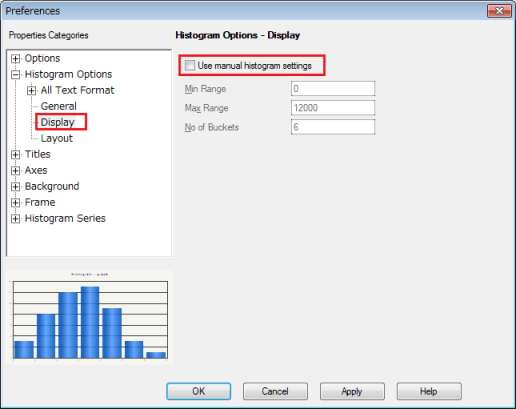
  1. Make sure that the histogram option “Use manual histogram settings” is unchecked.
ka02R000000kYDTQA2_0EM440000002C5O.jpeg


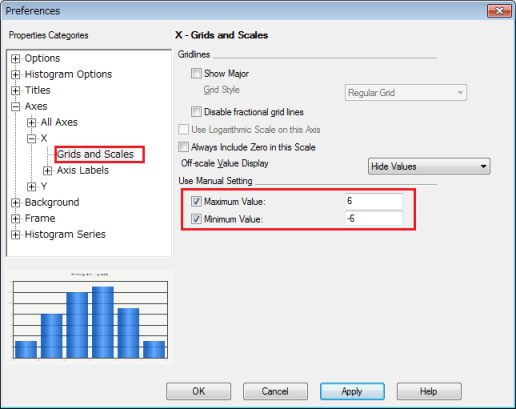
  1. Set the maximum and minimum values in the X-axes.
ka02R000000kYDTQA2_0EM440000002C5j.jpeg


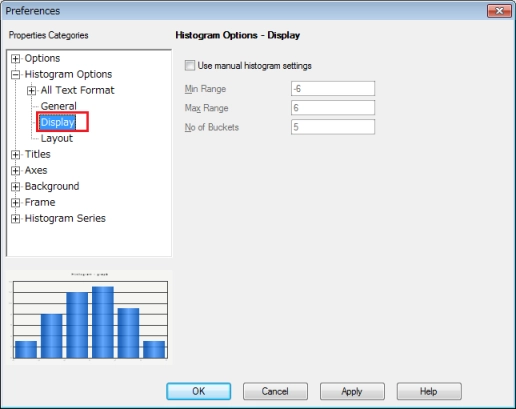
  1. Go back to Histogram options > Display
ka02R000000kYDTQA2_0EM440000002C5h.jpeg


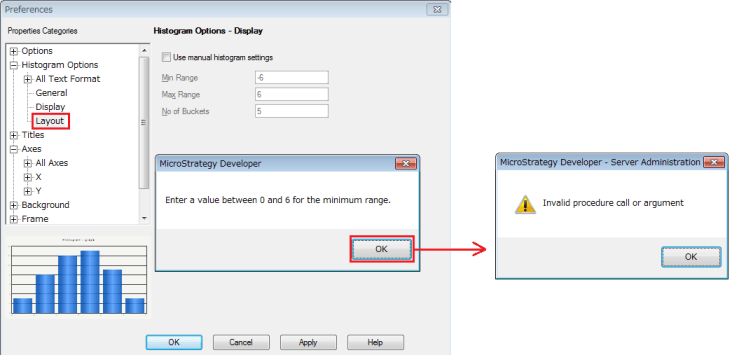
  1. Without making any changes in Step 3, view other options such as Histogram Options > Layout. An error message “Invalid procedure call or argument” is displayed after clicking the OK button in the first message.
ka02R000000kYDTQA2_0EM440000002C5Q.jpeg

 
CAUSE:
This is a known issue in Strategy Developer 9.4.x and 9.5.x.
 
ACTION:
Currently this issue is still being reviewed for feasibility by our Technology team and it is not scoped for any upcoming scheduled Strategy release.


Comment

0 comments

Details

Knowledge Article

Published:

June 9, 2017

Last Updated:

June 9, 2017