EducationSoftwareStrategy.com
StrategyCommunity

Knowledge Base

Product

Community

Knowledge Base

TopicsBrowse ArticlesDeveloper Zone

Product

Download SoftwareProduct DocumentationSecurity Hub

Education

Tutorial VideosSolution GalleryEducation courses

Community

GuidelinesGrandmastersEvents
x_social-icon_white.svglinkedin_social-icon_white.svg
Strategy logoCommunity

© Strategy Inc. All Rights Reserved.

LegalTerms of UsePrivacy Policy
  1. Home
  2. Topics

KB244201: Is it possible to modify the value of the Histogram option “No of Buckets” when a negative value is set in the minimum range?


Stefan Zepeda

Salesforce Solutions Architect • Strategy


Is it possible to modify the value of the Histogram option “No of Buckets” when a negative value is set in the minimum range?

SYMPTOM:
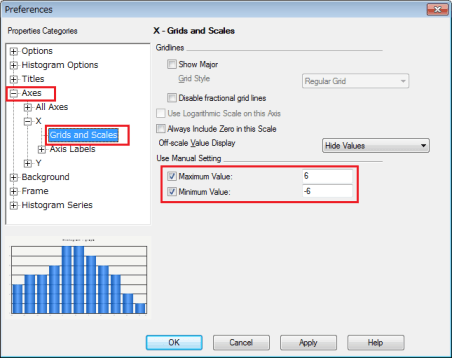
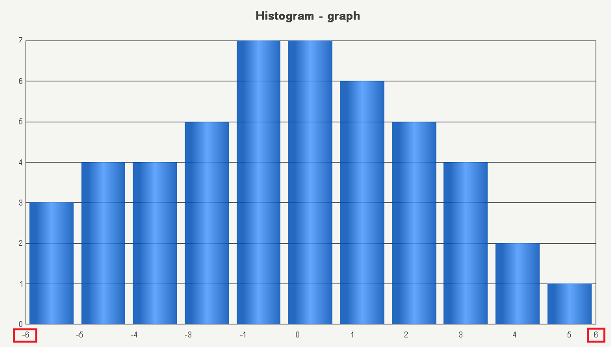
The minimum and maximum values of X-axes in histogram allow users to enter negative values and the graph will produce a correct output accordingly as shown below.
ka02R000000kbomQAA_0EM440000002C5S.jpeg
ka02R000000kbomQAA_0EM440000002C5X.jpeg


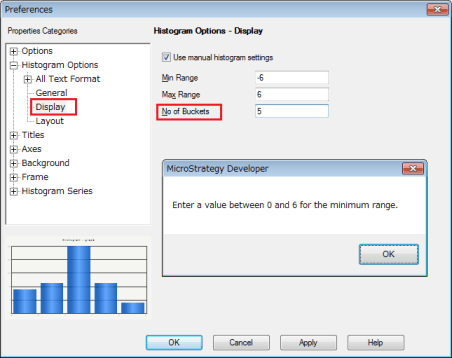
When modifying the value of the option “No of Buckets” under the Histogram options, however, an error message “Enter a value between 0 and X for the minimum range” is displayed.
ka02R000000kbomQAA_0EM440000002C5U.jpeg


CAUSE:
It is currently not possible to modify the value of “No of Buckets” when the minimum value is negative.
 
ACTION:
An enhancement request has been created to add this functionality in future versions. This enhancement is still being reviewed for feasibility by our Technology team and it is not scoped for any upcoming scheduled Strategy release.
 
The Strategy Internal Reference Number for the issue discussed in this technical note is 1015845.


Comment

0 comments

Details

Knowledge Article

Published:

June 8, 2017

Last Updated:

June 8, 2017