EducationSoftwareStrategy.com
StrategyCommunity

Knowledge Base

Product

Community

Knowledge Base

TopicsBrowse ArticlesDeveloper Zone

Product

Download SoftwareProduct DocumentationSecurity Hub

Education

Tutorial VideosSolution GalleryEducation courses

Community

GuidelinesGrandmastersEvents
x_social-icon_white.svglinkedin_social-icon_white.svg
Strategy logoCommunity

© Strategy Inc. All Rights Reserved.

LegalTerms of UsePrivacy Policy
  1. Home
  2. Topics

KB245815: ORA-00979 error occurs when case statement is used in Group-by while Oracle native driver does not throw the error.


Community Admin

• Strategy


The following knowledge base article describes one possible cause of the error ORA-00979 when using a case statement in the group by with the MicroStrategy Oracle Wire Protocol Driver. A solution is provided.

SYMPTOM:
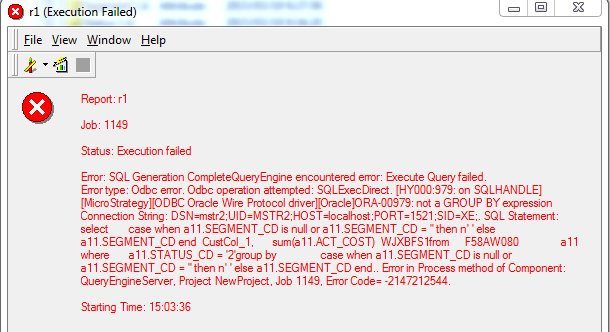
  In Strategy 9.4.x, an ORA-00979 error occurs when a case statement is used in the Group-by, while the Oracle native driver does not throw the error as shown in the image below:
ka04W000000OeagQAC_0EM4400000029E8.jpeg


Error: SQL Generation Complete

QueryEngine encountered error: Execute Query failed.

Error type: Odbc error. Odbc operation attempted: SQLExecDirect. [HY000:979: on SQLHANDLE] [Strategy][ODBC Oracle Wire Protocol driver][Oracle]ORA-00979: not a GROUP BY expression 
Connection String: DSN=mstr2;UID=MSTR2;HOST=localhost;PORT=1521;SID=XE;. SQL Statement: 
selectcase when a11.SEGMENT_CD is null or a11.SEGMENT_CD = '' then n' ' else a11.SEGMENT_CD end  CustCol_1,
sum(a11.COST)  WJXBFS1
from F58AW080 a11
where a11.STATUS_CD = '2'
group by case when a11.SEGMENT_CD is null or a11.SEGMENT_CD = '' then n' ' else a11.SEGMENT_CD end..

Error in Process method of Component: QueryEngineServer, Project NewProject, Job 1149, Error Code= -2147212544.

 
STEPS TO REPRODUCE:

  1. Create a database table with 3 columns, SEGMENT_CD, STATUS_CD and COST.
  2. Create an attribute with the following expression: ApplySimple("case when #0 is null or #0 = '' then n' ' else #0 end", [SEGMENT_CD])
  3. Create an attribute which is mapped to the STATUS_CD column.
  4. Create a fact mapped to the COST column.
  5. Create a metric based off the fact created in the previous step, Sum(cost).
  6. Create a report and add the attribute from Step 2 and the metric from Step 5.
  7. Add the filter which qualifies the attribute from Step_3 on ‘STATUS_CD (ID) Exactly 2’.
  8. Run the report and note that an ORA-00979 error occurs.
  9. No error is thrown when running the same SQL through the Oracle Native driver.

 
ACTION:
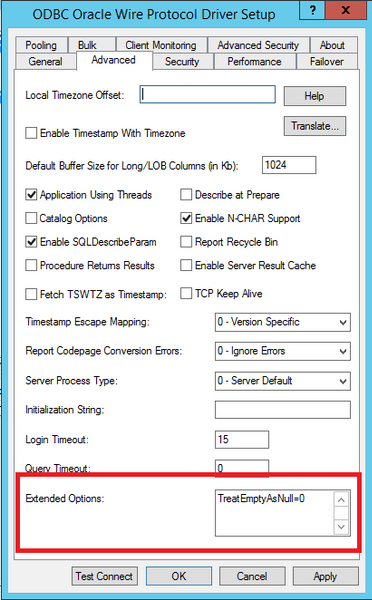
The error is not thrown by setting the hidden connect option TreatEmptyAsNull to "0".
Add TreatEmptyAsNull=0 in the field for "Extended Options" under the Advance tab of DSN as shown in the image below:
 

ka04W000000OeagQAC_0EM4400000029ED.jpeg

Comment

0 comments

Details

Knowledge Article

Published:

June 8, 2017

Last Updated:

June 8, 2017