EducationSoftwareStrategy.com
StrategyCommunity

Knowledge Base

Product

Community

Knowledge Base

TopicsBrowse ArticlesDeveloper Zone

Product

Download SoftwareProduct DocumentationSecurity Hub

Education

Tutorial VideosSolution GalleryEducation courses

Community

GuidelinesGrandmastersEvents
x_social-icon_white.svglinkedin_social-icon_white.svg
Strategy logoCommunity

© Strategy Inc. All Rights Reserved.

LegalTerms of UsePrivacy Policy
  1. Home
  2. Topics

KB246194: “Column 'xxx' datatype 3 with precision 28 scale 8 is not supported” error occurs when running reports against an Amazon Redshift warehouse in MicroStrategy 9.x


Community Admin

• Strategy


This issue has been classified as a defect by MicroStrategy. The impact is limited to reports using objects which map to columns with numeric datatypes of length greater than 19 against an Amazon Redshift warehouse, for example numeric (28,8). 

SUMMARY
This issue has been classified as a defect by Strategy. The impact is limited to reports using objects which map to columns with numeric datatypes of length greater than 19 against an Amazon Redshift warehouse, for example numeric (28,8). 
SYMPTOM
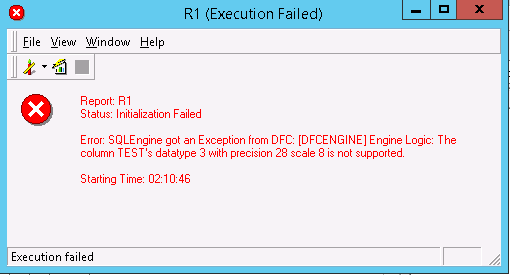
In Strategy 9.x, an attribute has a form datatype of Numeric (28,8). On the Amazon Redshift side also, the datatype of this column in Numeric (28,8). When using that attribute on certain reports, “Column 'xxx' datatype 3 with precision 28 scale 8 is not supported” error occurs when running report against an Amazon Redshift warehouse as shown below:
ka04W000000Of5VQAS_0EM440000002C5G.jpeg

Below entry is caught in DSSErrors.log:


Error: Data type conversion failed: from DSS type to native type. Database type: [4200]SQLEngine got an Exception from DFC: [DFCENGINE] Engine Logic: The column TEST’s datatype 3 with precision 28 scale 8 is not supported. Error in Process method of Component: SQLEngineServer, Project Waffle, Job 4840, Error Code= -2147212800.

CAUSE
This is a known issue in Strategy 9.x. This issue is seen because of an incorrect setting in the DTMAPPING.PDS file, for the Amazon Redshift database.
ACTION
This issue is expected to be released in the next release after Strategy 10. Contact Strategy Technical Support for additional details.
WORKAROUND
 There are two workarounds available:

  1. Modify the column alias from a NUMERIC(XX,X) datatype (where XX is > 19) to a DECIMAL (XX,X) datatype.
  2. Contact Strategy Technical Support team for an updated DTMAPPING.PDS file.


Comment

0 comments

Details

Knowledge Article

Published:

June 8, 2017

Last Updated:

June 8, 2017