EducationSoftwareStrategy.com
StrategyCommunity

Knowledge Base

Product

Community

Knowledge Base

TopicsBrowse ArticlesDeveloper Zone

Product

Download SoftwareProduct DocumentationSecurity Hub

Education

Tutorial VideosSolution GalleryEducation courses

Community

GuidelinesGrandmastersEvents
x_social-icon_white.svglinkedin_social-icon_white.svg
Strategy logoCommunity

© Strategy Inc. All Rights Reserved.

LegalTerms of UsePrivacy Policy
  1. Home
  2. Topics

KB246478: "Object with ID 'xxx' and type 52 (Link)" error received when running List Security Filters outline in MicroStrategy Command Manager


Community Admin

• Strategy


"Object with ID 'xxx' and type 52 (Link)" error received when running List Security Filters outline in MicroStrategy Command Manager 9.4.x

SUMMARY
This article discusses an object not found error when running a particular outline within Strategy Command Manager 9.4.x.
 
SYMPTOM
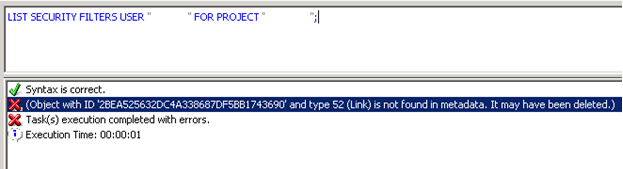
When running the Strategy Command Manager outline to list security filters, the error below is received.
ka04W000000OebaQAC_0EM440000002C5g.jpeg


Object with ID ‘xxx’ and type 53 (Link) is not found in metadata. It may have been deleted.
 
CAUSE
This particular object ID is an out of the box object which exists for each project.  If a project is missing this object, the above error can occur.
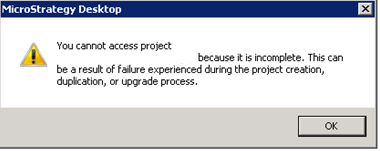
One way this can occur is if there is an incomplete project existing in the metadata, such as from a failed project duplication or creation.  An incomplete project can be found when trying to open the project using Strategy Developer.

ka04W000000OebaQAC_0EM440000002C5P.jpeg


You cannot access project ‘xxx’ because it is incomplete.  This can be a result of failure experienced during the project creation, duplication, or upgrade process.

 
ACTION
Delete the incomplete project from the metadata to resolve the issue.
Please contact Strategy Technical Support if assistance is needed identifying the incomplete project or determining if the root cause is the same as above.


Comment

0 comments

Details

Knowledge Article

Published:

June 8, 2017

Last Updated:

June 8, 2017