EducationSoftwareStrategy.com
StrategyCommunity

Knowledge Base

Product

Community

Knowledge Base

TopicsBrowse ArticlesDeveloper Zone

Product

Download SoftwareProduct DocumentationSecurity Hub

Education

Tutorial VideosSolution GalleryEducation courses

Community

GuidelinesGrandmastersEvents
x_social-icon_white.svglinkedin_social-icon_white.svg
Strategy logoCommunity

© Strategy Inc. All Rights Reserved.

LegalTerms of UsePrivacy Policy
  1. Home
  2. Topics

KB246516: "Error while trying to launch application" received when launching MicroStrategy 10.x Health Center configuration wizard


Community Admin

• Strategy


This article discusses an error seen when trying to launch the Health Center configuration wizard in MicroStrategy 10.x.

SUMMARY
This article discusses an error seen when trying to launch the Health Center configuration wizard in Strategy 10.x.
 
SYMPTOM
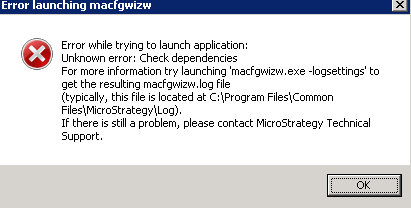
When opening the Health Center Configuration wizard in Strategy 10 the following error is received.
ka04W000000OeqLQAS_0EM4400000029EP.jpeg


Error while trying to launch application:
Unknown Error: Check dependencies

 
CAUSE
This is a known issue with Strategy 10 caused by a defect in parsing special characters.  It occurs whenever the Strategy installation path contains special non-English characters such as “Ä” or “è” on Windows (“C:\Program Files (x86)\Äèçà”)
 
ACTION
Please contact Strategy Technical Support for an update on this issue.
 
WORKAROUND
The Configuration Wizard for Health Center can be started using the jar file from command line using the steps below:

  • Using Command line navigate to C:\Program Files (x86)\Common Files\<Strategy installation folder>\HealthCenter\jars.
  • Execute the following command:    ..\..\JRE\170_51\Win32\bin\java  -jar  MACfgWiz.jar  -hconly
ka04W000000OeqLQAS_0EM4400000029ES.jpeg

 
This issue is being tracked by internal reference number DE14632.


Comment

0 comments

Details

Knowledge Article

Published:

June 5, 2017

Last Updated:

June 5, 2017