EducationSoftwareStrategy.com
StrategyCommunity

Knowledge Base

Product

Community

Knowledge Base

TopicsBrowse ArticlesDeveloper Zone

Product

Download SoftwareProduct DocumentationSecurity Hub

Education

Tutorial VideosSolution GalleryEducation courses

Community

GuidelinesGrandmastersEvents
x_social-icon_white.svglinkedin_social-icon_white.svg
Strategy logoCommunity

© Strategy Inc. All Rights Reserved.

LegalTerms of UsePrivacy Policy
  1. Home
  2. Topics

KB247393: Error "HTML Documents are no longer supported in the version you are using." appears when attempting to run an HTML Document in MicroStrategy Web 10


Community Admin

• Strategy


Error "HTML Documents are no longer supported in the version you are using." appears when attempting to run an HTML Document in MicroStrategy Web

SYMPTOM:
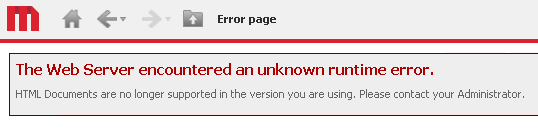
Users attempting to run an HTML Document in Strategy Web 10 may encounter the following error message:
 

ka04W000000OhikQAC_0EM4400000025g4.jpeg


The Web Server encountered an unknown runtime error.
HTML Documents are no longer supported in the version you are using. Please contact your Administrator.

 
CAUSE:
HTML Documents are no longer supported starting in Strategy Web 10.
 
WORKAROUND:
HTML Documents may still be executed through Strategy Developer. From Developer, users can Print, View Source, and Save the HTML Document to a physical *.html file. Serve the saved *.html file out of any web server in order to view it outside of Strategy Web.


Comment

0 comments

Details

Knowledge Article

Published:

April 18, 2017

Last Updated:

April 18, 2017