EducationSoftwareStrategy.com
StrategyCommunity

Knowledge Base

Product

Community

Knowledge Base

TopicsBrowse ArticlesDeveloper Zone

Product

Download SoftwareProduct DocumentationSecurity Hub

Education

Tutorial VideosSolution GalleryEducation courses

Community

GuidelinesGrandmastersEvents
x_social-icon_white.svglinkedin_social-icon_white.svg
Strategy logoCommunity

© Strategy Inc. All Rights Reserved.

LegalTerms of UsePrivacy Policy
  1. Home
  2. Topics

KB248003: When importing a .mstr file that uses the Connect Live feature from MicroStrategy Analytics Desktop 10, the error "cannot read property fnm" shows and the visualizations show the error "QueryEngine encountered an error %1"


Community Admin

• Strategy


There is an issue with changing the Connect Live feature in MicroStrategy Analytics Desktop 10. This issue has been classified as a defect by MicroStrategy. A solution/code fix for this issue is not available in current releases but is being reviewed for a future MicroStrategy release.

SUMMARY:
There is an issue with changing the Connect Live feature in Strategy Analytics Desktop 10. This issue has been classified as a defect by Strategy. A solution/code fix for this issue is not available in current releases but is being reviewed for a future Strategy release.
 
SYMPTOM:
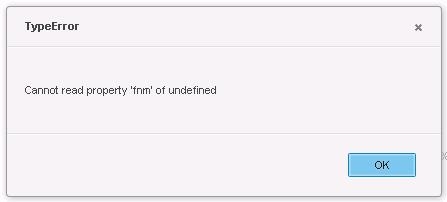
When importing an .mstr file that uses the Connect Live feature from Strategy Analytics Desktop 10 into Strategy Analytics Enterprise 10 via Web, after opening the dashboard the following error shows:
 

ka04W000000OgifQAC_0EM4400000025fv.jpeg


Cannot read property ‘fnm’ of undefined
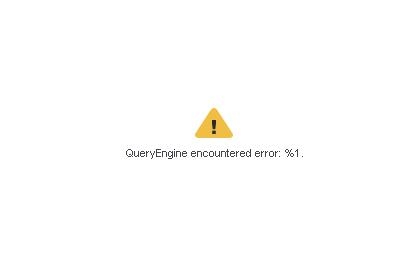
 
 
And after clicking OK, the following error shows:
 

ka04W000000OgifQAC_0EM4400000025fw.jpeg


QueryEngine encountered error: %1

 
STEPS TO REPRODUCE:

  1. In Strategy Analytics Desktop 10, start using an external data source.
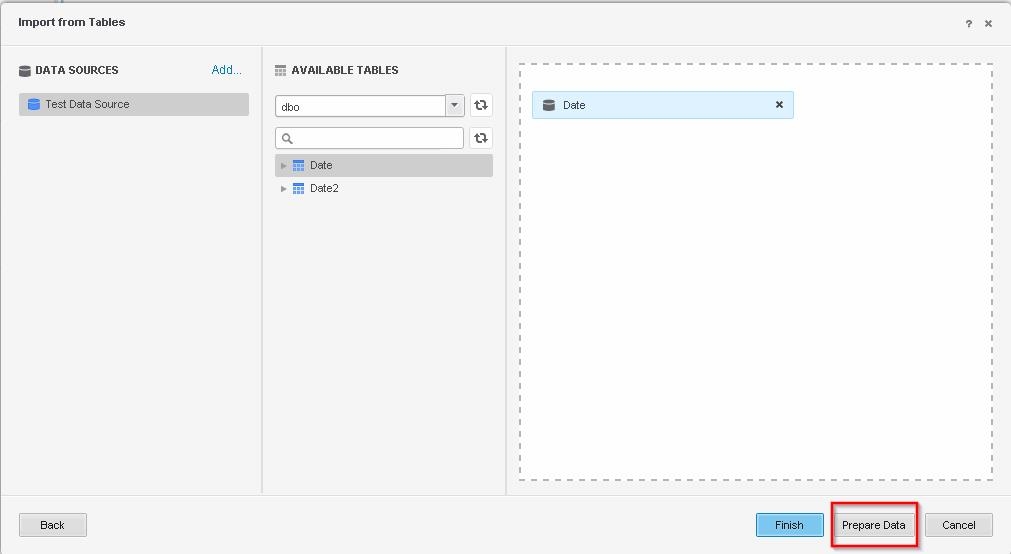
  2. Select the tables you want to use in the dashboard and select Prepare data.


ka04W000000OgifQAC_0EM4400000025ft.jpeg
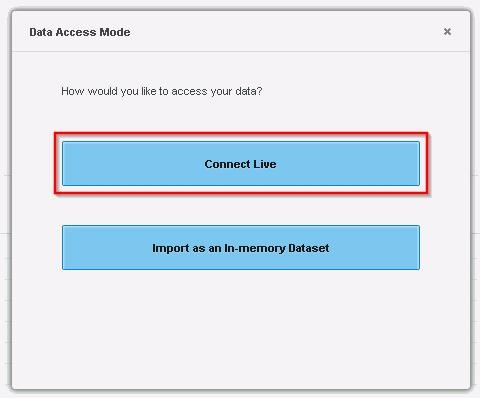
  1. Select the Data Access Mode ‘Connect Live’.


ka04W000000OgifQAC_0EM4400000025fi.jpeg


  1. Create a dashboard with a simple visualization.
  2. In Strategy Web, Import the .mstr file, and after it finishes select ‘View dashboard;.
  3. When opening the newly imported dashboard, the error “Cannot read property ‘fnm’ of undefined” will show, and after clicking OK, the visualization will show the “QueryEngine encountered error: %1” error.

 
CAUSE:
This is a known issue in Strategy Analytics Desktop 10.
 
ACTION:
Currently this issue is still being reviewed for feasibility by our Technology team and it is not scoped for any upcoming scheduled Strategy release.
 
The Strategy Internal Reference Number for the issue discussed in this technical note is 1016197.
 
WORKAROUND:
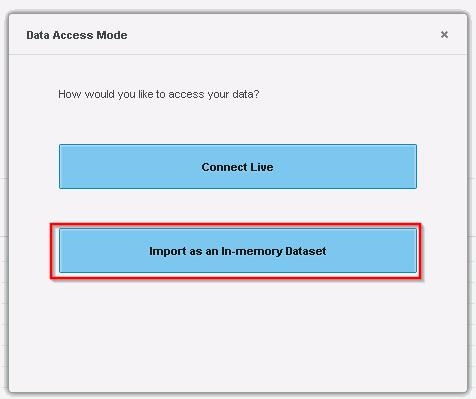
When choosing your Data Access Mode in Strategy Analytics Desktop, choose the option to ‘Import as an in-memory dataset’.
 

ka04W000000OgifQAC_0EM4400000025fu.jpeg

Comment

0 comments

Details

Knowledge Article

Published:

June 12, 2017

Last Updated:

June 12, 2017