SUMMARY:
This document shows one known issue that "Cannot find a function corresponding to XIRR...Cube import: failed to copy file" error appears when attempting to upgrade project to Strategy 10 Secure Enterprise. This is caused by inaccessible path specified for Intelligent Cube file directory. The workaround is to change the path and use one Strategy 10 Intelligence Server could access.
SYMPTOM:
The following error message appears in Configuration Wizard when attempting to upgrade project to Strategy 10 Secure Enterprise:

(Cannot find a function corresponding to XIRR.Cannot find a function corresponding to XNPV.Cannot find a function corresponding to RScriptSimple.Cannot find a function corresponding to RScriptU.Cannot find a function corresponding to RScript.Cannot find a function corresponding to RScriptAggU.Cannot find a function corresponding to RScriptAgg.Cannot find a function corresponding to PatternMatch.Cannot find a function corresponding to PatternMatchDiff.Cannot find a function corresponding to PatternMatchCorr.Cannot find a function corresponding to HistogramMedian.Cannot find a function corresponding to BandNames.Cannot find a function corresponding to GetExtraOutput.Cannot find a function corresponding to NullToEmpty.Cannot find a function corresponding to PercentRankRelative.Cannot find a function corresponding to PercentRank.Cannot find a function corresponding to OrdinalRank.Cannot find a function corresponding to WeightedStDev.Cannot find a function corresponding to WeightedMean.Cannot find a function corresponding to WeightedCov.Cannot find a function corresponding to WeightedCorr.Cannot find a function corresponding to LastPosition.Cannot find a function corresponding to TitleCap.Cannot find a function corresponding to ConcatAgg.Cannot find a function corresponding to ToString.Cannot find a function corresponding to ToNumber.Cannot find a function corresponding to Replace.Cannot find a function corresponding to Match.Cannot find a function corresponding to Split.Cannot find a function corresponding to Char.Cannot find a function corresponding to RepeatStr.Cannot find a function corresponding to BeginsWith.Cannot find a function corresponding to EndsWith.Cannot find a function corresponding to FiscalWeek.Cannot find a function corresponding to FiscalMonth.Cannot find a function corresponding to FiscalQuarter.Cannot find a function corresponding to FiscalYear.Cannot find a function corresponding to ToDateTime.Cannot find a function corresponding to QuarterStartDate.Cannot find a function corresponding to WeekStartDate.Cannot find a function corresponding to DateDiff.Cannot find a function corresponding to Search.Cannot find a function corresponding to Ampersand.Cannot find a function corresponding to Descendants.Cannot find a function corresponding to Ancestors.Cannot find a function corresponding to Parents.Cannot find a function corresponding to Children.Cannot find a function corresponding to BitAnd.Cannot find a function corresponding to BitOr.Cannot find a function corresponding to BitXor.Cannot find a function corresponding to BitNot.Cannot find a function corresponding to BitLeftShift.Cannot find a function corresponding to BitRightShift.Cannot find a function corresponding to IfByDimty.Object with ID '2C05D4BF4FCDE07833FC42AE1E4CAB31' and type 61 (GraphStyle) is not found in metadata. It may have been deleted.Object with ID '4F2A6AB944DECA70877D99BE219F8873' and type 61 (GraphStyle) is not found in metadata. It may have been deleted.Object with ID '7CFB55FE4DC7A977B07F5C9B35B0EDC7' and type 12 (Attribute) is not found in metadata. It may have been deleted.Object with ID '7CFB55FE4DC7A977B07F5C9B35B0EDC7' and type 12 (Attribute) is not found in metadata. It may have been deleted.Object with ID 'AB50A68B4DE2386950BC3F85F47F49E0' and type 12 (Attribute) is not found in metadata. It may have been deleted.Cube import: failed to copy file C:\Windows\TEMP\1AAA45E54E8DC5587B4892BC8B11D4BE\6C7AF29644961FF7A806FD8DA6488213\73A627C54644C0B0F2A5F7AFEBBE72B3\1189F69042FCFF0335A17DA2AA3C1F87.cube to \\Server1\Cube\1189F69042FCFF0335A17DA2AA3C1F87.cube, error is MFileSystem::File::OpenDescriptor: ::CreateFileW failed for '\\Server1\Cube\1189F69042FCFF0335A17DA2AA3C1F87.cube'.
System Error 0x00000035 (53): --- The network path was not found.)
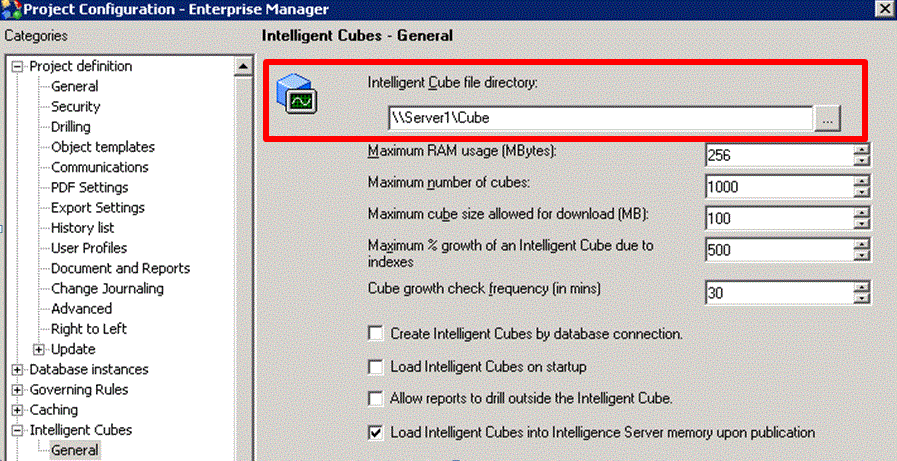
Cube import: failed to copy file C:\Windows\TEMP\1AAA45E54E8DC5587B4892BC8B11D4BE\6C7AF29644961FF7A806FD8DA6488213\73A627C54644C0B0F2A5F7AFEBBE72B3\1189F69042FCFF0335A17DA2AA3C1F87.cube to \\Server1\Cube\1189F69042FCFF0335A17DA2AA3C1F87.cube, error is MFileSystem::File::OpenDescriptor: ::CreateFileW failed for '\\Server1\Cube\1189F69042FCFF0335A17DA2AA3C1F87.cube'.
System Error 0x00000035 (53): --- The network path was not found.)

Cube import: failed to copy file C:\Windows\TEMP\1F6A5678475A605DC81FFCA04A4B3866\6C7AF29644961FF7A806FD8DA6488213\73A627C54644C0B0F2A5F7AFEBBE72B3\1189F69042FCFF0335A17DA2AA3C1F87.cube to E:\Cube\1189F69042FCFF0335A17DA2AA3C1F87.cube, error is MFileSystem::File::OpenDescriptor: ::CreateFileW failed for 'E:\Cube\1189F69042FCFF0335A17DA2AA3C1F87.cube'.
System Error 0x00000003 (3): --- The system cannot find the path specified.)
