EducationSoftwareStrategy.com
StrategyCommunity

Knowledge Base

Product

Community

Knowledge Base

TopicsBrowse ArticlesDeveloper Zone

Product

Download SoftwareProduct DocumentationSecurity Hub

Education

Tutorial VideosSolution GalleryEducation courses

Community

GuidelinesGrandmastersEvents
x_social-icon_white.svglinkedin_social-icon_white.svg
Strategy logoCommunity

© Strategy Inc. All Rights Reserved.

LegalTerms of UsePrivacy Policy
  1. Home
  2. Topics

KB248738: How To Remove A Language In The Dropdown Menu In Web Preferences With MicroStrategy Web SDK


Community Admin

• Strategy


SUMMARY: An administrator may want to remove some languages available to user in the dropdown menu for Language in Web Preferences. This can be done with Strategy Web SDK 9.4.1
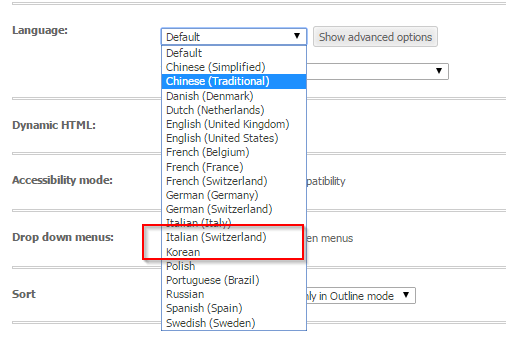
Before customization:
ka04W000000Og8CQAS_0EM440000002GPk.jpeg

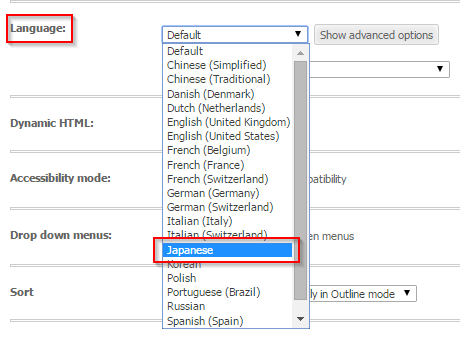
After customization:

ka04W000000Og8CQAS_0EM440000002GPh.jpeg

Follow these steps to achieve this customization:

  1. Make a copy of the file locales.xml under <Web Folder>/WEB-INF/xml and put it into the your plugin under <plugin name>/WEB-INF/xml
  2. Open the copied file and go to language to be removed, add the property deleted="1" to the corresponding locale node e.g. To remove Japanese from the list (the added part is in bold):

    <locale deleted="1" locale-id="1041" language="ja" country="JP" desc="Japanese" desc-id="mstrWeb.954" char-set="UTF-8" char-set-excel="UnicodeLittle" codepage="65001" codepage-excel="932" char-set-help="UTF-8" />
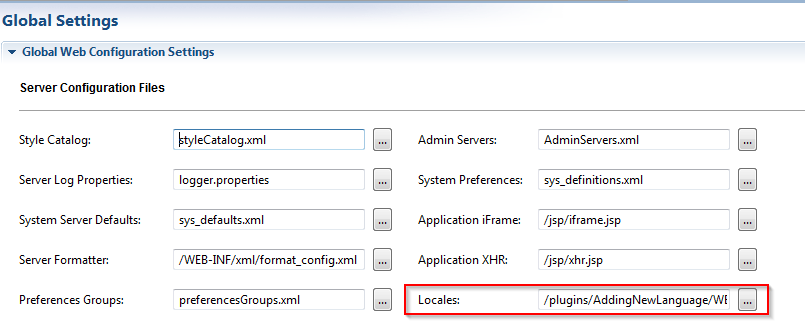
  • Open the Web Customization Editor, go to Application Settings > Strategy Web Configuration > Web Configuration Settings, double-click Strategy Configuration Settings to open it in the editor
  • Select the tab Global Settings > Server Configuration Files > Locales and point it to the locales.xml file in the plugin:
ka04W000000Og8CQAS_0EM440000002GPc.jpeg
  • Restart the application server

 
CUSTOMIZATION WARNING:
This customization is provided as a convenience to Strategy users and is only directly applicable to the version stated. While this code may apply to other releases directly, Strategy Technical Support makes no guarantees that the code provided will apply to any future or previous builds. In the event of a code change in future builds, Strategy Technical Support makes no guarantee that an updated version of this particular customization will be provided. In the event of a code change in future builds, Strategy may not be able to provide additional code on this matter even though this customization is provided at this time for this specific build. For enhancements to this customization or to incorporate similar functionality into other versions, contact your Account Executive to inquire about Strategy Consulting assistance.


Comment

0 comments

Details

Knowledge Article

Published:

June 22, 2017

Last Updated:

June 22, 2017