EducationSoftwareStrategy.com
StrategyCommunity

Knowledge Base

Product

Community

Knowledge Base

TopicsBrowse ArticlesDeveloper Zone

Product

Download SoftwareProduct DocumentationSecurity Hub

Education

Tutorial VideosSolution GalleryEducation courses

Community

GuidelinesGrandmastersEvents
x_social-icon_white.svglinkedin_social-icon_white.svg
Strategy logoCommunity

© Strategy Inc. All Rights Reserved.

LegalTerms of UsePrivacy Policy
  1. Home
  2. Topics

KB249035: When executing a grid report containing a date attribute through Excel, no data elements are returned using MicroStrategy Office


Community Admin

• Strategy


This knowledge base article explains a potential root cause for no elements being returned using MicroStrategy Office in a multilingual environment.

SUMMARY
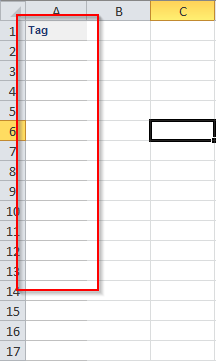
When executing a report with a date attribute through Strategy Office in Excel, the report executes successfully though does not return any attribute elements:
ka04W000000Of3FQAS_0EM4400000025bQ.jpeg

 
The issue is only observed on client machines using Windows regional settings that differ from the Microsoft Office SKU locale and using an Intelligence Server machine on any Linux distribution.
 
CAUSE
This issue is caused by the lack of Multilingual User Interface installation on the client machine.
 
ACTION
Install the Microsoft Multilingual User Interface (MUI) that corresponds to the locale selected in the Windows Regional Settings.


Comment

0 comments

Details

Knowledge Article

Published:

June 13, 2017

Last Updated:

June 13, 2017