EducationSoftwareStrategy.com
StrategyCommunity

Knowledge Base

Product

Community

Knowledge Base

TopicsBrowse ArticlesDeveloper Zone

Product

Download SoftwareProduct DocumentationSecurity Hub

Education

Tutorial VideosSolution GalleryEducation courses

Community

GuidelinesGrandmastersEvents
x_social-icon_white.svglinkedin_social-icon_white.svg
Strategy logoCommunity

© Strategy Inc. All Rights Reserved.

LegalTerms of UsePrivacy Policy
  1. Home
  2. Topics

KB249467: “[ODBC Salesforce driver][Salesforce]INVALID_LOGIN: Invalid username, password, security token; or user locked out.” error message occurs when attempting to connect to Salesforce through database Data Import in MicroStrategy Web 10


Community Admin

• Strategy


After creating a DSN to Salesforce through the ODBC Administrator, users receive an error message when attempting to connect to this DSN for database data import in MicroStrategy Web 10.

SYMPTOM:
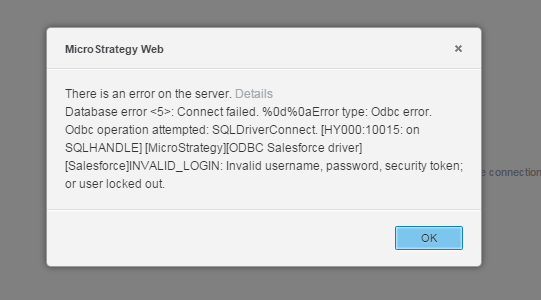
After creating a DSN to Salesforce through the ODBC Administrator, users receive the following error message when attempting to connect to this DSN for database data import in Strategy Web 10:
 

ka04W000000OaXKQA0_0EM4400000025eL.jpeg


There is an error on the server. Details
Database error <5>: Connect failed. %0d%0aError type: Odbc error. Odbc operation attempted: SQLDriverConnect. [HY000:10015: on SQLHANDLE][Strategy][ODBC Salesforce driver][Salesforce]INVALID_LOGIN: Invalid username, password, security token; or user locked out.
 
CAUSE:
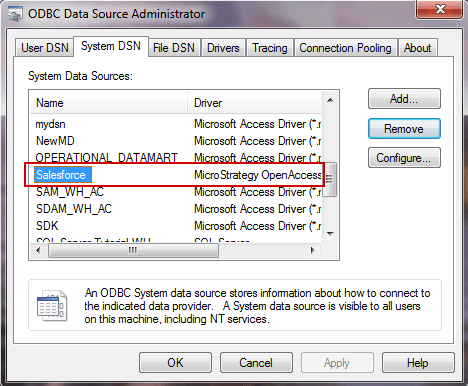
This issue occurs when users created the DSN through the 32-bit ODBC Administrator which uses the OpenAccess driver, like shown below:
 

ka04W000000OaXKQA0_0EM4400000025eE.jpeg

 
Note: If the original DSN was created through Connectivity Wizard, check the DSN in the ODBC Administrator to confirm if it is using the correct driver. If the driver shows as the Strategy OpenAccess driver, there may be an issue with the Strategy installation. 
 
ACTION:
Create the DSN through Connectivity Wizard or through the 64-bit ODBC Administrator using the out of the box ‘Strategy ODBC Driver for Salesforce’.
 
KB249467


Comment

0 comments

Details

Knowledge Article

Published:

March 31, 2017

Last Updated:

December 31, 2018