EducationSoftwareStrategy.com
StrategyCommunity

Knowledge Base

Product

Community

Knowledge Base

TopicsBrowse ArticlesDeveloper Zone

Product

Download SoftwareProduct DocumentationSecurity Hub

Education

Tutorial VideosSolution GalleryEducation courses

Community

GuidelinesGrandmastersEvents
x_social-icon_white.svglinkedin_social-icon_white.svg
Strategy logoCommunity

© Strategy Inc. All Rights Reserved.

LegalTerms of UsePrivacy Policy
  1. Home
  2. Topics

KB249700: Edit links hyperlinks set to Answer dynamically will replace leading spaces in attribute elements with nbsp; in MicroStrategy Web


Community Admin

• Strategy


Users can use Edit Links in a Report Services Document to navigate to another report or document and answer prompts on the target object dynamically, depending on the element clicked on to execute the link. However, if the element starts with a leading space character, when linking, the space is replaced with “nbsp;” in the target. Thus, the target report prompt will not match any answers and the report will show: "No data returned for this view. This might be because the applied filter excludes all data".
SYMPTOM:
In Strategy Web 10.0, users can use Edit Links in a Report Services Document to navigate to another report or document and answer prompts on the target object dynamically, depending on the element clicked on to execute the link. However, if the element starts with a leading space character, when linking, the space is replaced with “nbsp;” in the target. Thus, the target report prompt will not match any answers and the report will show:


"No data returned for this view. This might be because the applied filter excludes all data".

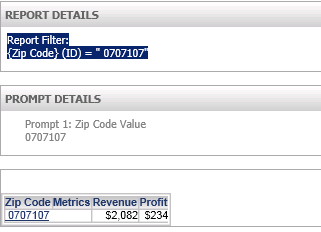
As an example, notice the space character in front of the Zip Code element in the report filter shown here:

ka04W00000148XKQAY_0EM4400000025c0.jpeg

After clicking on the Edit Link to navigate to the target, the space character is lost and the prompt is answered with an incorrect element, causing no data to be returned:
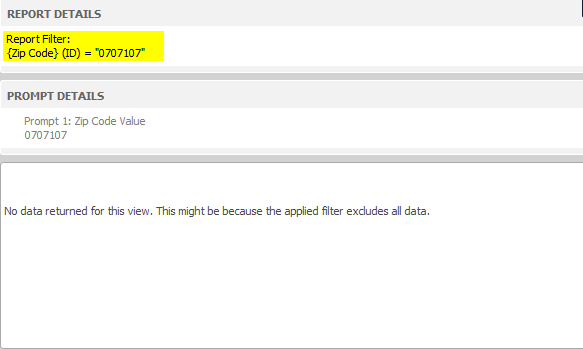
ka04W00000148XKQAY_0EM4400000025by.jpeg

STEPS TO REPRODUCE:

  1. Insert into the database an attribute element that starts with a space. 
  2. Create a prompted report with this attribute.
  3. Create a document with this prompted report. 
  4. Set an Edit Links hyperlink on the attribute to the prompted report creatd in step 2.
  5. Set the prompt answering mode to "Answer dynamically."
  6. Run the document and click on an attribute element that does not start with a space, and it will pass the answer to the prompt correctly.
  7. Return to the document and click on the attribute element that starts with a space.
  8. In the target report window the message "No data returned for this view. This might be because the applied filter excludes all data" appears. And in the filter details, the space has been replaced with "nbsp;".

CAUSE:
This is an identified defect in Strategy Web 10.0.
ACTION:
This issue has been addressed in Strategy version 10.1. Please upgrade to take advantage of the fix.
WORKAROUND:
This issue does not occur when using URL API. For more information on passing prompt answers refer to tech note KB45965 .


Comment

0 comments

Details

Knowledge Article

Published:

May 10, 2017

Last Updated:

May 10, 2017