EducationSoftwareStrategy.com
StrategyCommunity

Knowledge Base

Product

Community

Knowledge Base

TopicsBrowse ArticlesDeveloper Zone

Product

Download SoftwareProduct DocumentationSecurity Hub

Education

Tutorial VideosSolution GalleryEducation courses

Community

GuidelinesGrandmastersEvents
x_social-icon_white.svglinkedin_social-icon_white.svg
Strategy logoCommunity

© Strategy Inc. All Rights Reserved.

LegalTerms of UsePrivacy Policy
  1. Home
  2. Topics

KB249746: Filter Panel selectors show all elements instead of selected elements when exported to HTML in MicroStrategy Web.


Community Admin

• Strategy


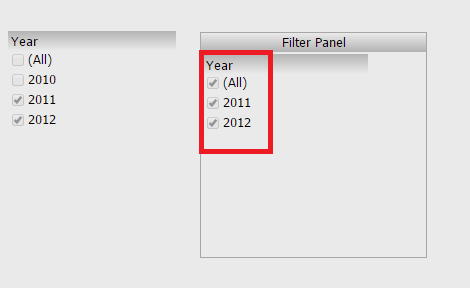
In MicroStrategy Web 9.4.1, users can create a filter panel in a document within which they can add selectors. However, when exported to HTML, these selectors do not retain their selections. Instead, they show all elements.

SYMPTOM:
In Strategy Web, users can create a filter panel in a document within which they can add selectors. However, when exported to HTML, these selectors do not retain their selections. Instead, they show all elements.
Before exporting:
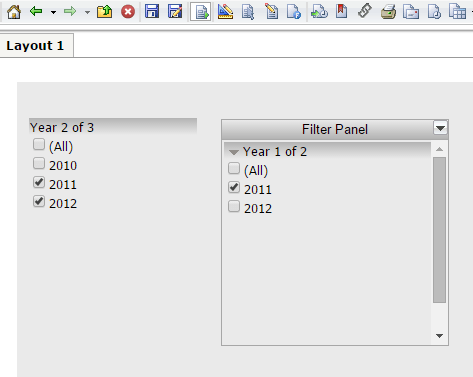
ka04W000000Of02QAC_0EM4400000025Zi.jpeg

After exporting to HTML:

ka04W000000Of02QAC_0EM4400000025Zr.jpeg

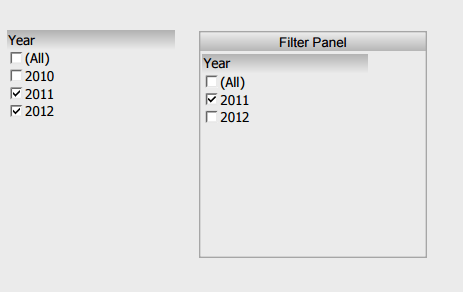
This issue does not occur in any of the Strategy Web view modes, or when exported to PDF.
 
STEPS TO REPRODUCE:
  • Create a document with a dataset
  • Add a checkbox selector with one of the attributes.
  • Add a filter panel, and add another checkbox selector.
  • Run the document in Strategy Web, and select different elements for each of the 2 selectors, as shown below:
ka04W000000Of02QAC_0EM4400000025Zi.jpeg
  • Export to PDF. Notice the selections show for both selectors, as shown below:
ka04W000000Of02QAC_0EM4400000025Zg.jpeg
  • Export to HTML. Notice the standalone selector shows the expected selections, but the filter panel selector shows all elements.

 
CAUSE:
This is a known issue in Strategy Web 9.4.1 and 10.x.
 
ACTION:
Strategy will continue to investigate and post updates as soon as they are available.
 
WORKAROUND:
The issue only occurs when a selector is located within a filter panel, so users can use standalone selectors instead of filter panels to avoid the issue.


Comment

0 comments

Details

Knowledge Article

Published:

June 16, 2017

Last Updated:

June 16, 2017