SYMPTOM:
URL API used to launch a report or document in Strategy Web 10.0 returns the following error for reports:
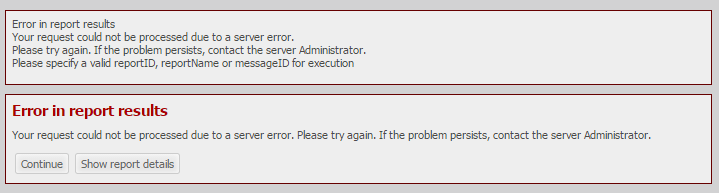
Error in report results
Your request could not be processed due to a server error.
Please try again. If the problem persists, contact the server Administrator.
Please specify a valid reportID, reportName or messageID for exection

Error in document results
Please specify either a valid document ID, document name or a message ID.
CAUSE:
This is a known issue in Strategy Web 10.0 when the URL API link includes the &uid and &pwd parameters.
Note: This issue only occurs if at the time the URL is executed, the user doesn't already have a session established, although this defeats the purpose of including those parameters in the URL. Or if the URL points to a folder instead of a Report or Document. Furthermore, even if the execution of the report or document fails with the errors above, the session is created successfully, and the user can navigate up, and then execute the failed object immediately after.
ACTION:
This issue has been addressed in Strategy Web 10.1. Upgrade to this version to take advantage of this fix.
WORKAROUND:
Remove the &uid and &pwd parameters from the URL.
