EducationSoftwareStrategy.com
StrategyCommunity

Knowledge Base

Product

Community

Knowledge Base

TopicsBrowse ArticlesDeveloper Zone

Product

Download SoftwareProduct DocumentationSecurity Hub

Education

Tutorial VideosSolution GalleryEducation courses

Community

GuidelinesGrandmastersEvents
x_social-icon_white.svglinkedin_social-icon_white.svg
Strategy logoCommunity

© Strategy Inc. All Rights Reserved.

LegalTerms of UsePrivacy Policy
  1. Home
  2. Topics

KB249764: The 'Clear Selection' option in Visual Iinsight is not clearing the selections in MicroStrategy Web 10.0


Community Admin

• Strategy


In MicroStrategy Web 10.0, if all elements are selected, including "All", the Clear Selections function doesn't do anything, except refresh the page. If at least one element is not selected, then the 'Clear Selections' function selects all of the elements, the opposite of what it is supposed to do

SYMPTOM:
In Strategy Web 10.0, if all elements are selected, including "All", the Clear Selections function doesn't do anything, except refresh the page. If at least one element is not selected, then the 'Clear Selections' function selects all of the elements, the opposite of what it is supposed to do.
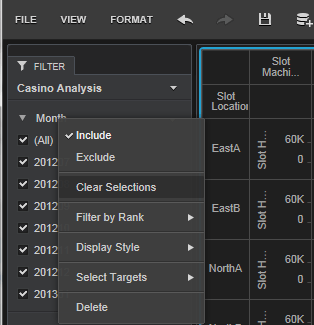
The image below shows the Clear selections option and shows all elements are still selected. 
ka04W000000OgiOQAS_0EM4400000025Zo.jpeg

 
STEPS TO REPRODUCE:

  1. In Strategy Web 10.0 run a Visual Insight dashboard.
  2. Enable the filter panel from the View menu.
  3. Add an attribute to the filter panel of any type.
  4. Select all selections for that selector.
  5. Right click on the filter on the filter panel.
  6. Select 'Clear selections'.
  7. Notice the selections don't get cleared, the data just gets refreshed.
  8. From the attribute on the filter panel, uncheck any of the selected elements.
  9. Right click the attribute again and select 'Clear  selections'
  10. Notice that all selections are enabled now. The exact opposite of what should be occurring.

CAUSE:
This is a known issue in Strategy Web 10.0.
ACTION:
This issue has been addressed in Strategy version 10.3 please upgrade to take advantage of the fix.


Comment

0 comments

Details

Knowledge Article

Published:

June 12, 2017

Last Updated:

June 12, 2017