EducationSoftwareStrategy.com
StrategyCommunity

Knowledge Base

Product

Community

Knowledge Base

TopicsBrowse ArticlesDeveloper Zone

Product

Download SoftwareProduct DocumentationSecurity Hub

Education

Tutorial VideosSolution GalleryEducation courses

Community

GuidelinesGrandmastersEvents
x_social-icon_white.svglinkedin_social-icon_white.svg
Strategy logoCommunity

© Strategy Inc. All Rights Reserved.

LegalTerms of UsePrivacy Policy
  1. Home
  2. Topics

KB249770: The Fill color for the background of a dropdown selector is not applied in MicroStrategy Mobile for iOS.


Community Admin

• Strategy


Custom background color for selectors are not applied in MicroStrategy Mobile.

SYMPTOM:
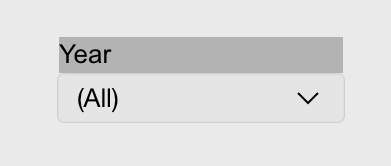
In Strategy Web 10.0, users can change the background fill color for dropdown selectors. In Strategy Mobile 10.0 for iOS, however, the custom color is not applied. Instead, the default grey fill is used, as shown below:
Display in Strategy Web:

ka04W000000Oe2QQAS_0EM4400000029vW.jpeg

Display in Strategy Mobile:

ka04W000000Oe2QQAS_0EM4400000029vI.jpeg

  
STEPS TO REPRODUCE:

  • Create a document with a dropdown selector.
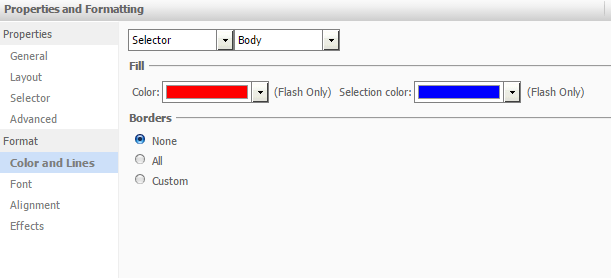
  • Edit the Properties & Formatting > Colors and Lines to change the Fill colors, as shown below:
ka04W000000Oe2QQAS_0EM4400000029vJ.jpeg
  • Execute the document in Strategy Web 10.0. Notice the custom fill colors apply.
  • Execute the document in Strategy Mobile 10.0 for iOS. Notice the default grey fill is used.

  
CAUSE:
This is a known issue in Strategy Mobile 10.0 for iOS.
  
ACTION:
This issue has been addressed in Strategy Mobile 10 Hotfix 1 for iOS. Upgrade to this version to take advantage of the fix.
The Strategy Internal Reference Number for the issue discussed in this technical note is 1016074.


Comment

0 comments

Details

Knowledge Article

Published:

April 4, 2017

Last Updated:

April 4, 2017