EducationSoftwareStrategy.com
StrategyCommunity

Knowledge Base

Product

Community

Knowledge Base

TopicsBrowse ArticlesDeveloper Zone

Product

Download SoftwareProduct DocumentationSecurity Hub

Education

Tutorial VideosSolution GalleryEducation courses

Community

GuidelinesGrandmastersEvents
x_social-icon_white.svglinkedin_social-icon_white.svg
Strategy logoCommunity

© Strategy Inc. All Rights Reserved.

LegalTerms of UsePrivacy Policy
  1. Home
  2. Topics

KB249925: How to Use URL API to go to the Create Prompt page in MicroStrategy Web 9.4.1


Community Admin

• Strategy


How to use URL API to go to the Create Prompt page in MicroStrategy Web 9.4.1

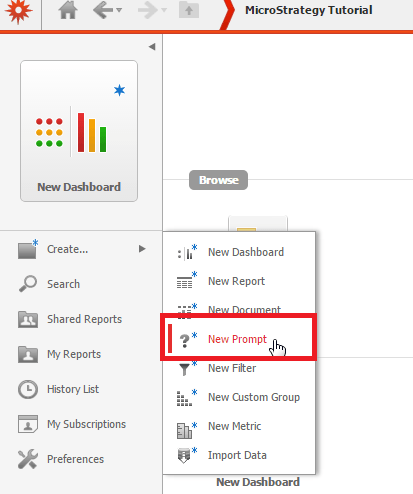
In Strategy Web 9.4.1, it is possible to create a new prompt by clicking the option shown below:
 

ka04W000001MKyGQAW_0EM440000002GOw.jpeg

 
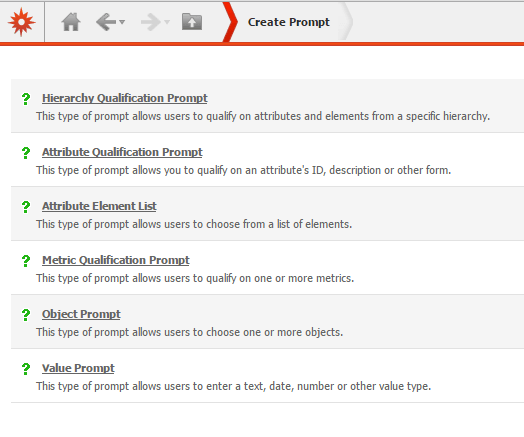
When clicking that option, the Create Prompt page will be displayed:
ka04W000001MKyGQAW_0EM440000002GOy.jpeg

With Strategy Web 9.4.1, users can use URL API to open this page. A sample URL is shown below:


http://WEBSERVERNAME:8080/MicroStrategy/servlet/mstrWeb?evt=3123&src=mstrWeb.3123&Project=PROJECTNAME&Server=SERVERNAME&uid=USERNAME&pwd=PASSWORD


Comment

0 comments

Details

Knowledge Article

Published:

March 31, 2017

Last Updated:

March 31, 2017