EducationSoftwareStrategy.com
StrategyCommunity

Knowledge Base

Product

Community

Knowledge Base

TopicsBrowse ArticlesDeveloper Zone

Product

Download SoftwareProduct DocumentationSecurity Hub

Education

Tutorial VideosSolution GalleryEducation courses

Community

GuidelinesGrandmastersEvents
x_social-icon_white.svglinkedin_social-icon_white.svg
Strategy logoCommunity

© Strategy Inc. All Rights Reserved.

LegalTerms of UsePrivacy Policy
  1. Home
  2. Topics

KB249962: How to get prompt xml string used in the promptAnswerXML parameter for the reportExecute task in MicroStrategy Web 10.7


Community Admin

• Strategy


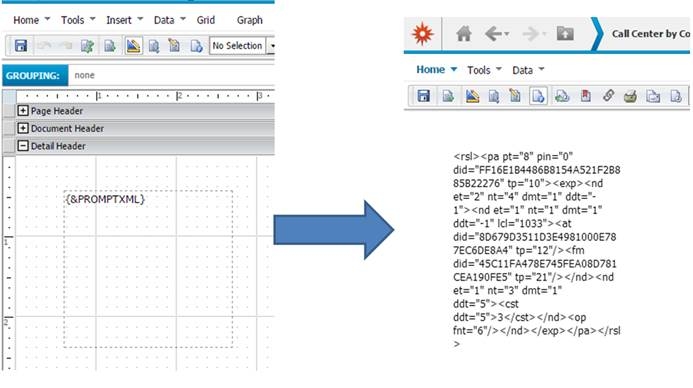
Using a macro in a document to retrieve the promptAnswerXML for a report within MicroStrategy Web.

To get the string value used in the promptAnswerXML parameter for the reportExecute task, create a document with the prompted report.  In the body of the document, add a text field with {&PROMPTXML} as it's text.  Run the document in presentation mode in order to copy the prompt xml to clipboard:
 

ka04W000000ObH8QAK_0EM440000002GOk.jpeg


249962


Comment

0 comments

Details

Knowledge Article

Published:

April 12, 2017

Last Updated:

March 28, 2019