EducationSoftwareStrategy.com
StrategyCommunity

Knowledge Base

Product

Community

Knowledge Base

TopicsBrowse ArticlesDeveloper Zone

Product

Download SoftwareProduct DocumentationSecurity Hub

Education

Tutorial VideosSolution GalleryEducation courses

Community

GuidelinesGrandmastersEvents
x_social-icon_white.svglinkedin_social-icon_white.svg
Strategy logoCommunity

© Strategy Inc. All Rights Reserved.

LegalTerms of UsePrivacy Policy
  1. Home
  2. Topics

KB250421: Connection string incorrect when perfoming data import from Impala using JDBC Driver on MicroStrategy Analytics Desktop 10.0 for Mac


Community Admin

• Strategy


Symptom
When performing data import from Impala on Strategy Analytics Desktop 10.0 for Mac, users need to use impala JDBC driver 2.5.22.1040 or higher. However using the driver with version 2.5.22.1040 or higher without modify the connection string, will generate the following error:


”(Database error<3>: JDBCConnectionWrapper::Connect failed. Message:com.cloudera.impala.jdbc4.Driver.Daatabase error<3>”


Steps to Reproduce:

  1. On Strategy Analytics Desktop 10.0 for Mac, click “Add data” and then click “Hadoop”
  2. Click on “Build a Query” or “Type a Query” or ”Pick Tables” in the “Select Import Options” dialog.
  3. Click “Add new data source” in DSN-less mode and choose database: "Impala" and version: "Impala 2.x" or "Impala 1.x"
  4. Click “Add driver” and choose the jar file (JDBC driver path) and click add.
  5. Input Host Name, Port Number, user name and password. Then confirm with OK.
  6. Click on the new created data source, it will return the following error message:
ka04W000001MKwdQAG_0EM4400000025dG.jpeg


There is an error on the server.
(Database error <3>: JdbcConnectorWrapper::Connect failed.
Disconnected. Error type: Unkown exception. Odbc operation attempted: Connect. Error Message: com.cloudera.impala.jdbc4.Driver.Database error <3>:JdbcConnectorWrapper::Connect failed.
Disconnected. Error type: Unkown exception. Odbc operation attempted: Connect. )

 
Cause
The old impala driver ImpalaJDBC4.jar is unable to read the catalog. The DB vendor has fixed the issue and delivered the fix with ImpalaJDBC41.jar.
 
Action
The corrected ImpalaJDBC41.jar file ships with Strategy Analytics Desktop 10 Hotfix 1. Upgrade to Strategy Analytics Desktop 10 Hotfix 1 to take advantage of the fix.
 
Workaround
For Strategy Analytics Desktop 10.0 GA, the following workaround can be applied, by changing the JDBC connection string:

  • Download the Impala JDBC driver with version 2.5.22.1040 or higher 
  • On Strategy 10.0 desktop on Mac, click “Add data”, then click “Hadoop”, then click any one of “Build a Query/Type a Query/Pick Tables”.
  • Click “Add new data source”, choose Database:Impala, Version: Impala 1.x or Impala 2.x. 
  • Click “Add driver” and choose the driver which downloaded in step 1.
  • Choose ”Edit connection string”, and input below connection string:
    
    JDBC;DRIVER={com.cloudera.impala.jdbc41.Driver};URL={jdbc:impala://hostname:port}; 
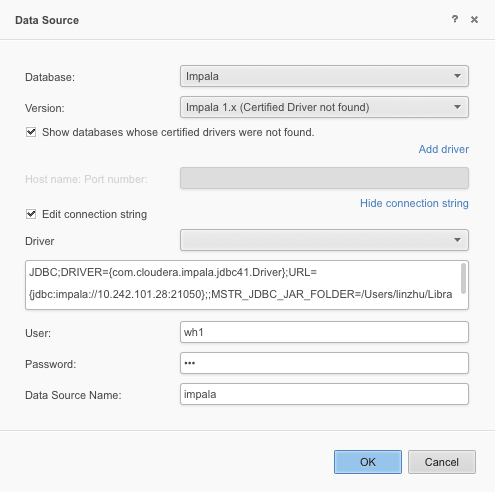
ka04W000001MKwdQAG_0EM4400000025dE.jpeg
  • Then we can data import from impala on Strategy 10.0 desktop successfully.

Comment

0 comments

Details

Knowledge Article

Published:

April 3, 2017

Last Updated:

April 3, 2017