Apple devices allow, with just a touch of the Home button, unlocking your iPhone or iPad by using the Touch ID sensor in the Home button. Starting with Strategy Mobile 10 Client for iOS together with Strategy Enterprise Platform 10.x, it is possible to take advantage of this feature to secure specific Reports or Report Service documents.
This document shows how to secure a Report or Report Service document.
Set Report as private in Strategy Web:
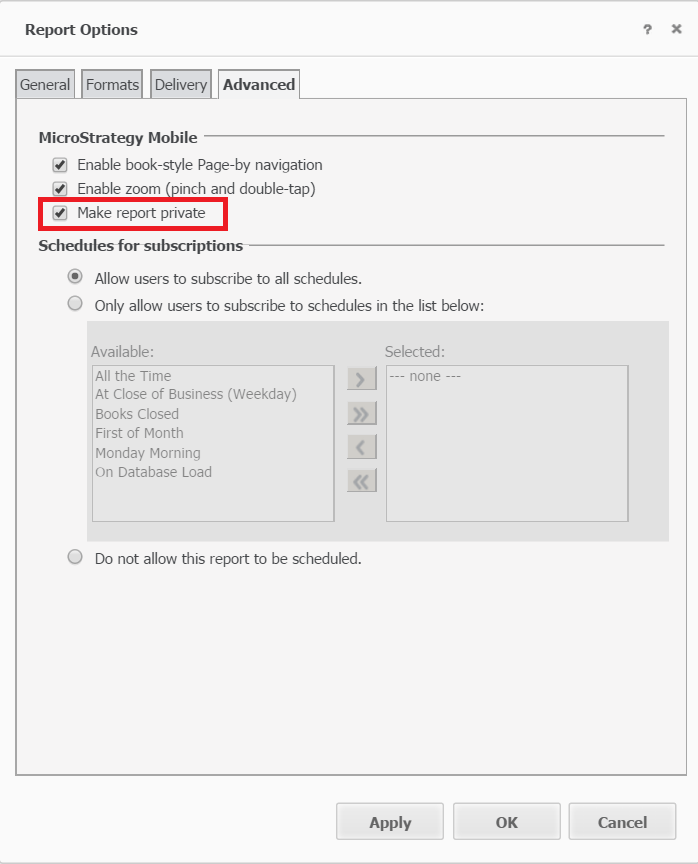
Open a report in Strategy Web 10, go to "Tools" --> "Report Option" --> "Advanced" tab, check the checkbox of "Make report private" and save the changes.
Set Report Service document as private in Strategy Web:
Open a Report Service Document in Strategy Web 10, go to "Tools" -- >"Document Properties" --> "Mobile" tab, check the checkbox of "Make document private" and save the changes.

Configure allow authentication via system pass code for Touch ID in Mobile Configuration:
By default, user is only allowed to be authenticated via Touch ID, as shown below:

To enable authentication via system pass code for Touch ID, create new or edit existing mobile configuration, in "General Settings" tab, check the checkbox of "Allow authentication via system pass code for Touch ID".

After that, use will have the option to either use Touch ID or pass code, as shown below:


