SUMMARY:
This issue has been classified as expected behavior by Strategy. The impact is limited to Strategy Developer 10.0 after adding a derived attribute in a document in Strategy Web 10.0. A workaround is available in the current document.
SYMPTOM:
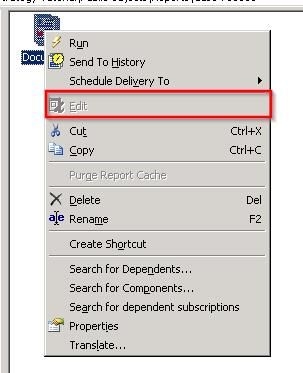
After editing a document in Strategy Web 10.0, adding a derived attribute to it; users will notice that the document is not able to be edited in Strategy Developer 10.0.
STEPS TO REPRODUCE:
CAUSE:
This behavior is working as designed in Strategy 10.0. The Edit Document option is not available through Strategy Developer because the document contains one or more Derived Attributes which is a new feature available only through Strategy Web 10.0.
WORKAROUND:
Edit the document in Strategy Web 10.0, or make all the changes needed in Strategy Developer 10.0 before adding the derived attribute in Strategy Web 10.0.
