EducationSoftwareStrategy.com
StrategyCommunity

Knowledge Base

Product

Community

Knowledge Base

TopicsBrowse ArticlesDeveloper Zone

Product

Download SoftwareProduct DocumentationSecurity Hub

Education

Tutorial VideosSolution GalleryEducation courses

Community

GuidelinesGrandmastersEvents
x_social-icon_white.svglinkedin_social-icon_white.svg
Strategy logoCommunity

© Strategy Inc. All Rights Reserved.

LegalTerms of UsePrivacy Policy
  1. Home
  2. Topics

KB254519: “Invalid Server URL” message appears when trying to set Usher configuration through proxy in MicroStrategy Web Administrator page.


Community Admin

• Strategy


“Invalid Server URL” message appears when trying to set Usher configuration through proxy in MicroStrategy Web Administrator page

SYMPTOM:
“Invalid Server URL” message appears when trying to set Usher configuration through proxy in Strategy Web Administrator page as shown in the image below:
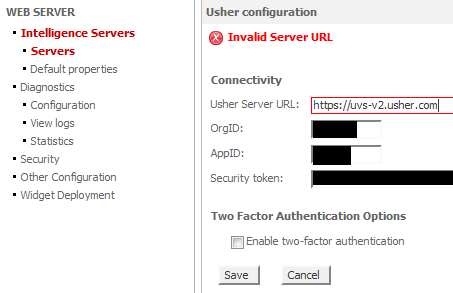
 

ka04W000000OdzbQAC_0EM4400000025cl.jpeg

 
STEPS TO REPRODUCE:

  • Create Usher Network in Network Manager (http://go.usher.com) and configure Strategy.
     
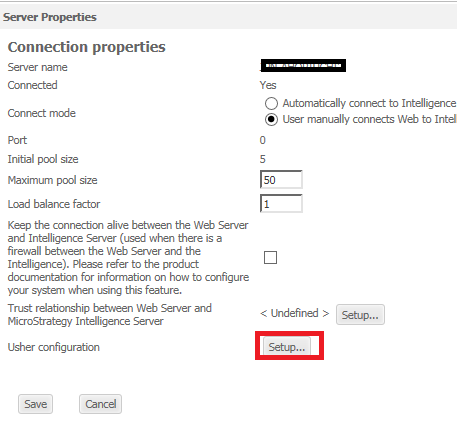
  • In Strategy Web Administrator page, click ‘Setup’ for Usher configuration in Sever Properties page.
ka04W000000OdzbQAC_0EM4400000025ci.jpeg
  • Input ‘https://uvs-v2.usher.com ‘as the Usher Server URL, and fill in the Usher parameters obtained from Usher Network.
     
  • “Invalid Server URL” message appears when clicking ‘Save’ button. Strategy Web does not support to use the proxy server for connection to Usher Server. This is a limitation in Strategy Web 9.5.x and 10.0.

 
CAUSE:
Strategy Web does not support to use the proxy server for connection to Usher Server. This is a limitation in Strategy Web 9.5.x and 10.x.
 
ACTION:
Currently this issue is being reviewed by Strategy for a potential code fix on an upcoming Strategy release.


Comment

0 comments

Details

Knowledge Article

Published:

June 14, 2017

Last Updated:

June 14, 2017