Starting in Strategy 10 Data Import in Web supported a new scenario where multiple tables could be imported as part of a single Data Import Cube. The basics of this feature are covered in KB235131. Now there are scenarios where these tables will only have partial data and a join needs to be performed between the tables. This Technical Note describes how the data from the two tables is joined in different situations.
Currently the behavior cannot be changed and defaults to outer joining all metrics unless attributes which only exist in one of the datasets are involved. Attributes only support showing rows where they have values so attributes not shared between the tables will eliminate rows from the result set where they do not possess a value. All data from both tables is kept in the cube so it is aware of what data does and does not source from each table. This ends up being handled similar to the data blending feature but without the ability to control join behavior.
This behavior is best seen through illustration and an example has been built to show the different scenarios.
Starting Data
Table 1
Year_ID | Last_year_ID |
2013 | 2012 |
2014 | 2013 |
2015 | 2014 |
2016 | 2015 |
Table 2
Year_ID | Year_date | Year_duration | Prev_Year_ID |
2012 | Sun Jan 01 00:00:00 BRST 2012 | 366 | 2011 |
2013 | Tue Jan 01 00:00:00 BRT 2013 | 365 | 2012 |
2014 | Wed Jan 01 00:00:00 BRT 2014 | 365 | 2013 |
2015 | Thu Jan 01 00:00:00 BRT 2015 | 365 | 2014 |
The Year_duration column and the last_year_id column are brought in as metrics to best illustrate the behavior. Everything else is brought in as an attribute. When Year_ID is brought in it is automatically linked and that link is left between the two tables.
Scenario 1
Just the year_ID attribute is placed on a grid.
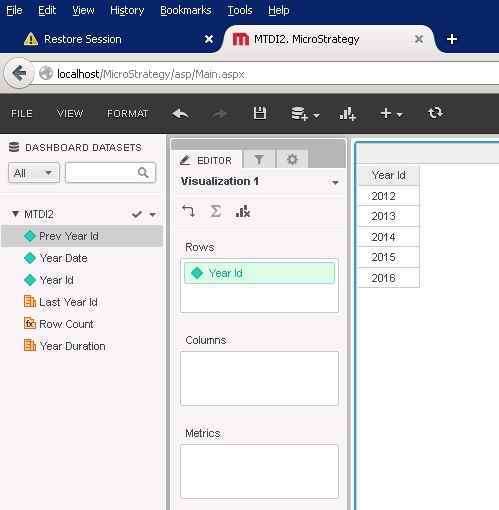
In this situation a full outer join is done between the two tables to get a full set of elements of the year_ID attribute
Scenario 2
The year_date attribute from table 2 is added to the grid.
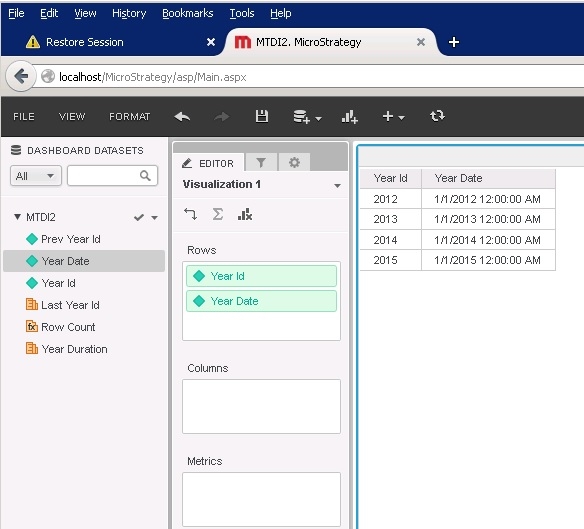
In this situation the presence of Year_date on the grid limits the data to just rows that exist in table 2 which is why the year 2016 is not seen.
Scenario 3
The year_id attribute with just one metric on the grid.
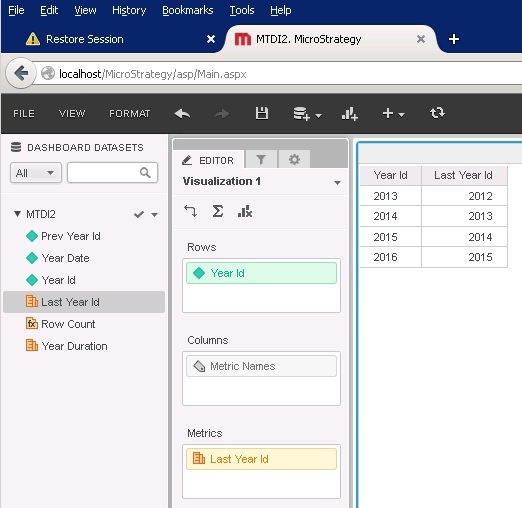
In this scenario the metric last_year_id comes from table 1 so only attribute elements from table 1 are seen. This does not include the year 2012.
Scenario 4
The year_id attribute with metrics from both tables are on the grid.
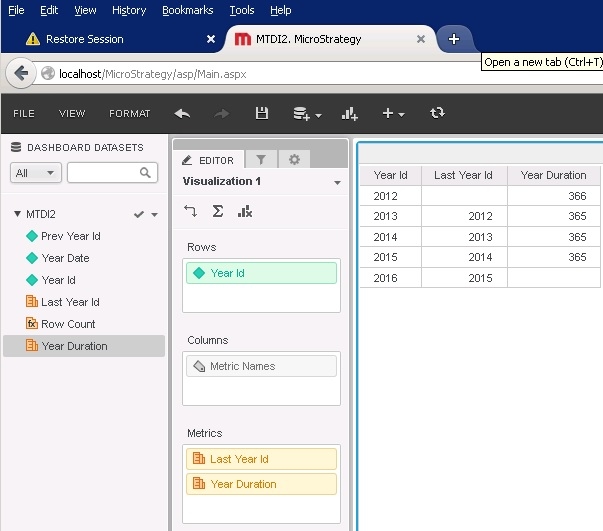
Here the presence of both metrics causes an outer join so all years are seen but the metrics are null for rows where their source table contained no data.
Scenario 5
The year_id, year_date attribute and metrics from both tables are on the grid.
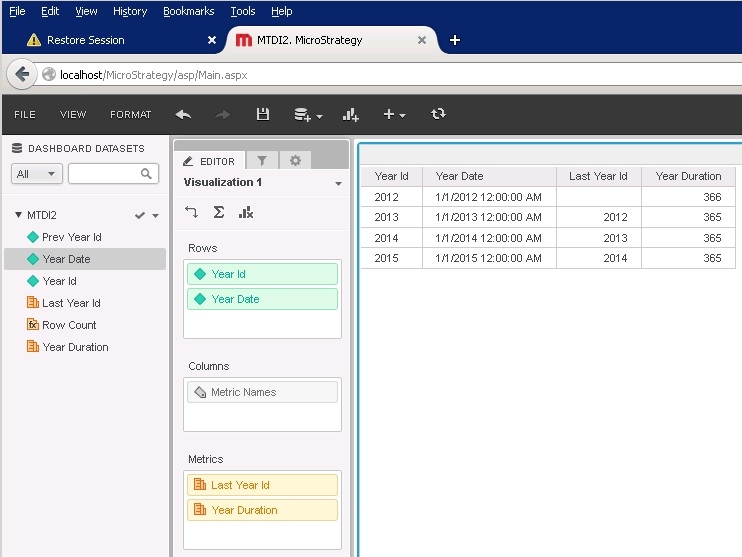
In this final scenario the addition of year_date limits the dataset to just rows from table 2 despite having a metric from table 1. This removes the row for the year 2016.
Conclusion
As can be seen above outer joins are done when possible and when it makes sense for the data. They are not done with attributes sourced from single tables for data integrity reasons. Any time rows of data could be shown with null attributes there is a data integrity issue as data would not be properly identified. This feature can be taken advantage of to force an inner join if an inner join is desired between the metrics of two tables.
