Question:
What are the pre-requisites for using the caches generated by Mobile Subscriptions when running the documents from a folder in a mobile device in Strategy 9.x and 10.x?
Answer:
We need to enable 2 settings in the mobile configuration URL.
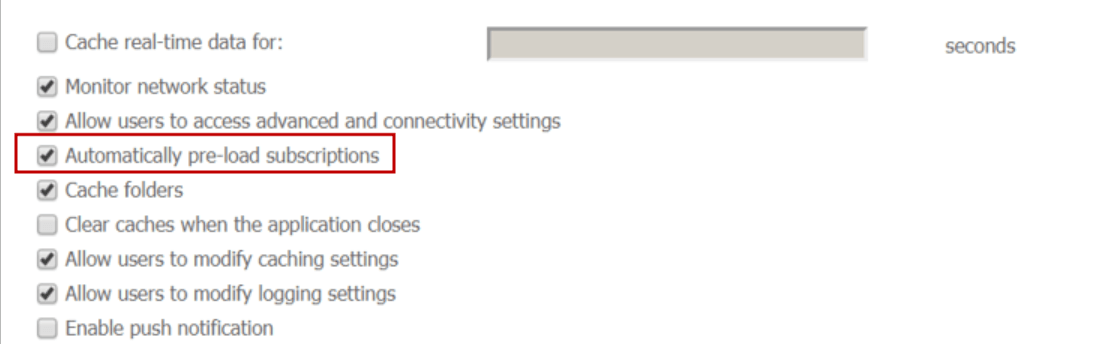
Step1. In the Settings tab of the mobile configuration, enable the “Automatically pre-load subscriptions” setting.
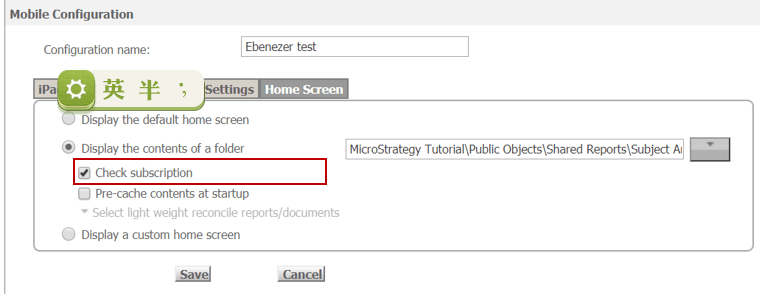
Step 2. On the Home Screen tab of the mobile configuration, select “Display the contents of a folder” or “Display a custom home screen”, and enable the “Check subscription” option.
Apply the URL in the mobile device. After the subscriptions are fully loaded to the mobile device, running the documents from a folder will retrieve the mobile subscription caches.
The above two settings are the pre-requisites for using the caches generated by mobile subscriptions when running the documents from a folder in a mobile device.
If the mobile device is configured manually, the mobile subscription caches will be used when running the documents from a folder. The mobile subscriptions can only be retrieved in the subscription list in mobile device.
Related TN:
KB221182: What are the pre-requisites for using Document Caches generated by Update Cache Subscriptions from a mobile device in MicroStrategy 9.x and 10.x?
