EducationSoftwareStrategy.com
StrategyCommunity

Knowledge Base

Product

Community

Knowledge Base

TopicsBrowse ArticlesDeveloper Zone

Product

Download SoftwareProduct DocumentationSecurity Hub

Education

Tutorial VideosSolution GalleryEducation courses

Community

GuidelinesGrandmastersEvents
x_social-icon_white.svglinkedin_social-icon_white.svg
Strategy logoCommunity

© Strategy Inc. All Rights Reserved.

LegalTerms of UsePrivacy Policy
  1. Home
  2. Topics

KB255685: An error message is displayed when importing data from Google Big Query using the Simba Big Query ODBC driver on MicroStrategy Analytics Enterprise 10


Community Admin

• Strategy


An error message is displayed when importing data from Google Big Query using the Simba Big Query ODBC driver on MicroStrategy Analytics Enterprise 10.

SYMPTOM
An error message is displayed when importing data from Google BigQuery with Simba ODBC driver on Strategy Analytics Enterprise 10.x.  The following scenarios have been found to generate errors:

  1. During data import, on the preview page, it will generate statement such as


select * from samples.natality limit 1000

The syntax “limit 1000” is an invalid SQL statement for BigQuery with the Simba ODBC driver.
2. If there is keyword in the SELECT statement, such as

select year Year from samples.natality 

In the statement above "year" is the keyword, the statement will fail to execute.
3. If there are columns with name like “a.b”, the data import will also fail. For example:

select repository.url repository.url from samples.github

The error message shown is:

syntax error near 
’ select repository.url repository.<<<????>>>url from samples.github’ 
 
STEPS TO REPRODUCE
To reproduce these scenarios, the Simba Big Query ODBC driver needs to be installed on the Intelligence Server machine.
 
Below are the reproduction steps for these three scenarios.
 
Scenario 1 - Syntax “limit 1000” Error
 

  1. On Strategy 10.0.x Web, click “Add External data”, then click “Database”
  1. Click  “Pick tables” in the “Select Import Options” dialog.
  1. Click “Add new data source”, in DSN-less mode, choose “Google Big Query” as database and version, enter the Token, catalog, user name and password. Then click OK.
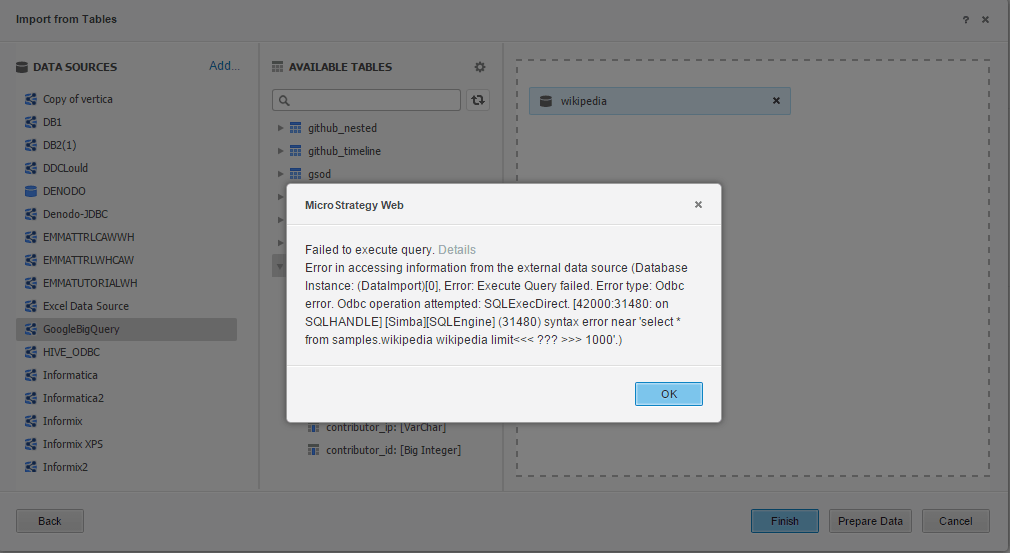
  1. Click on the new created data source, drag a table into the right panel, Click “Prepare data”, it will show the following error, as below:
ka04W000001MKwxQAG_0EM4400000029DX.jpeg


Failed to execute query.
Error in accessing information from the external data source (Database Instance:
(DataImport)(0), Error: Execute Query failed. Error type: Odbc error.
Odbc operation attempted: SQLExecDirect. 
[42000:31480: on SQLHANDLE][Simba][SQL Engine] (31480) syntax error near 
'select *from samples.wikipedia wikipedia limit <<< ??? >>> 1000'.)
 
Scenario 2 - Keyword error
 

  1. On Strategy 10.0.x Web, click “Add External data”, then click “Database”
  1. Click “Build a Query” in the “Select Import Options” dialog.
  1. Click “Add new data source”, in DSN-less mode, choose “Google Big Query” as database and version, input Token, catalog, user name, password. Then click OK.
  1. Click on the new created data source, drag a table into the right panel, double click on a column which contains keywords in SQL (click on Yearm for example) to add the column into the preview.
  1. Click “Edit SQL”, then remove “limit 1000” from the SQL statement.
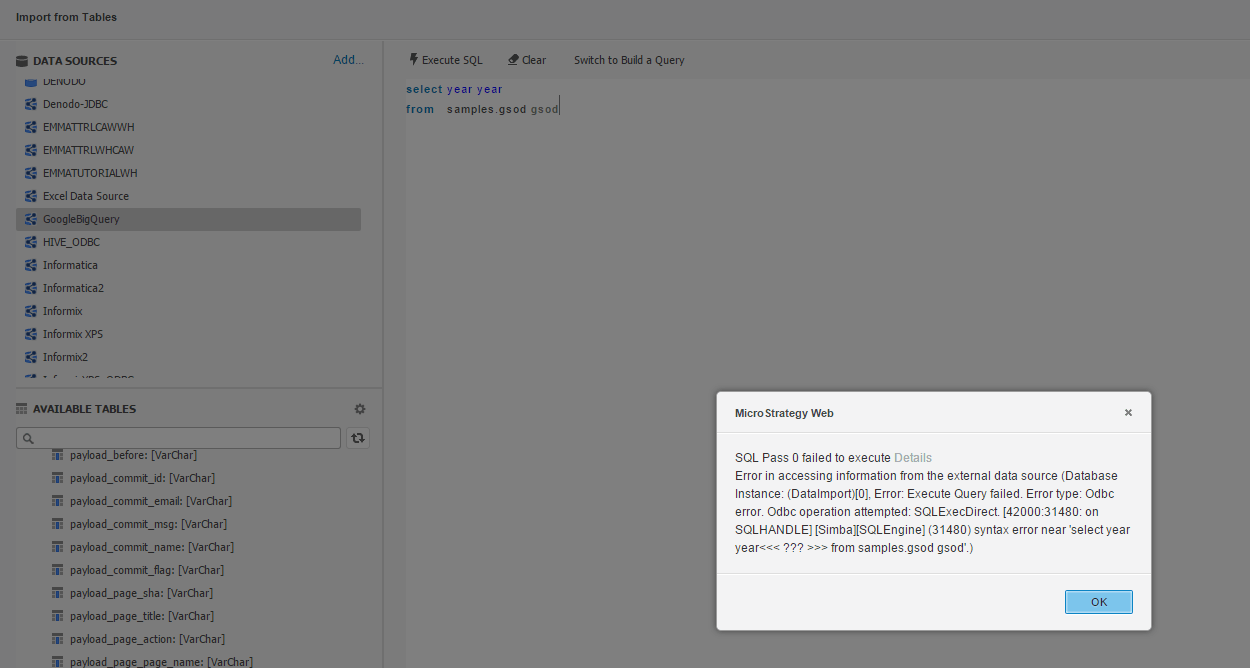
  1. Click “Execute SQL”, it will show the following error message below:
ka04W000001MKwxQAG_0EM4400000029DY.jpeg


SQL Pass 0 failed to execute
Error in accessing information from the external data source (Database 
Instance: (DataImport)(0), Error: Execute Query failed. Error type: Odbc 
error. Odbc operation attempted: SQLExecDirect [42000:31480: on 
SQLHANDLE][Simba][SQLEngine] (31480) syntax error near 'select year 
year<<< ??? >>> from samples.gsod gsod')
 
Scenario 3 - Column name that contains “a.b” error
 

  1. On Strategy 10.0.x Web, click “Add External data”, then click “Database”
  1. Click “Build a Query” in the “Select Import Options” dialog.
  1. Click “Add new data source”, in DSN-less mode, choose “Google Big Query” as a database and version. Input Token, catalog, user name and password. Then click OK.
  1. Click on the new created data source, drag a table into the right panel, click on a column named as “a.b” to add the column into the preview.
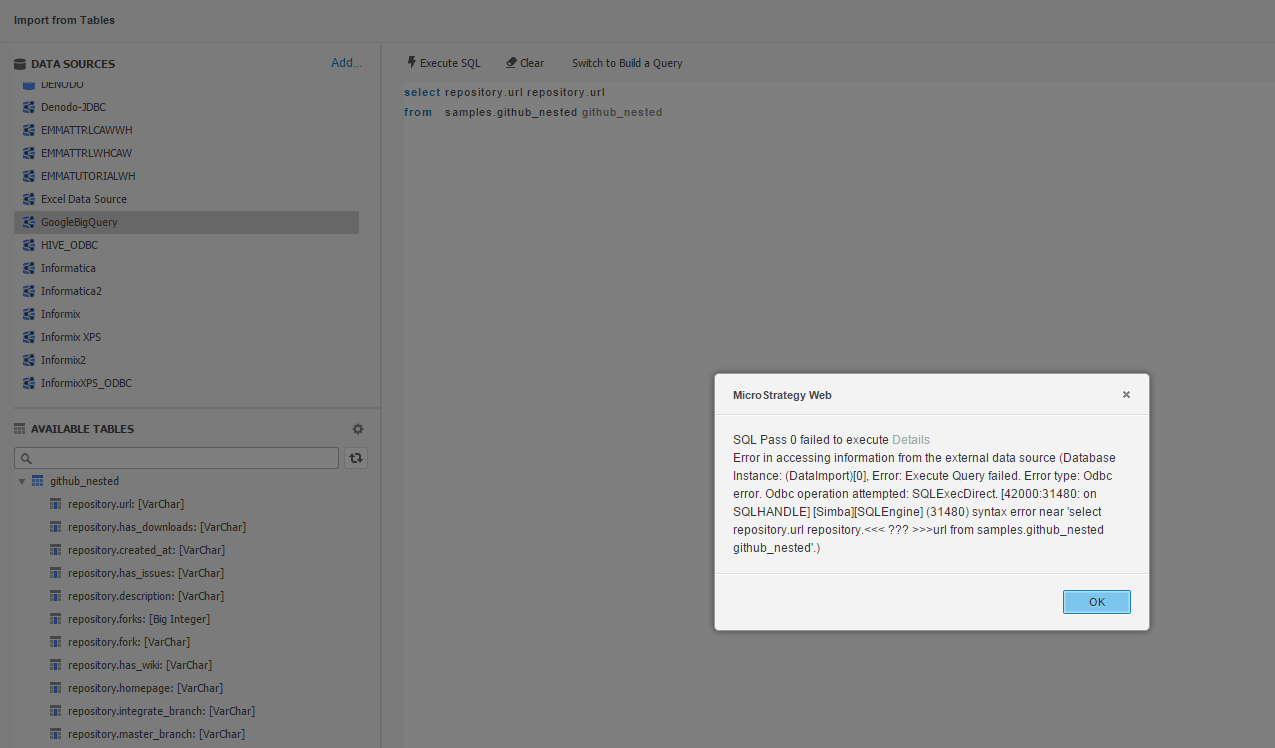
  1. Click “Execute SQL”, it will show the following error message below:
ka04W000001MKwxQAG_0EM4400000029Df.jpeg


SQL Pass 0 failed to execute
Error in accessing information from the external data source (Database 
Instance: (DataImport)(0), Error: Execute Query failed. Error type: Odbc 
error. Odbc operation attempted: SQLExecDirect [42000:31480: on 
SQLHANDLE][Simba][SQLEngine] (31480) syntax error near 
'select repository.url repository.
<<< ??? >>>url from samples.github_nested github_nested'.)
 
CAUSE
SQL syntax “limit 1000” is not supported by Simba Big Query ODBC driver, while it is supported by the Google Big Query ODBC driver. The SQL statement contains keywords or invalid column names isn’t ANSI SQL-compliant, so they are not supported by the Simba Big Query ODBC driver.
 
WORKAROUND
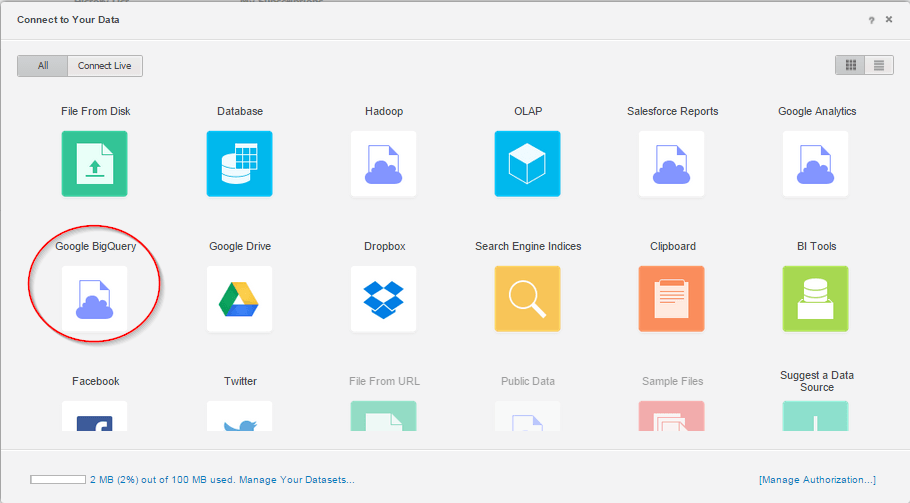
There is a workaround by using Google Big Query "oAuth" Method to data import from Google Big Query, as below:

  1. Configure the client ID and client secret in google big query
  1. On Strategy 10.0.x Web, click “Add External data”, then click “Google Big Query”, then click any one of “Build a Query/Type a Query/Pick Tables”.
ka04W000001MKwxQAG_0EM4400000029Dg.jpeg

 
3. Input the token, catalog, username and password information, then the above three cases can work well.


Comment

0 comments

Details

Knowledge Article

Published:

April 3, 2017

Last Updated:

April 3, 2017