EducationSoftwareStrategy.com
StrategyCommunity

Knowledge Base

Product

Community

Knowledge Base

TopicsBrowse ArticlesDeveloper Zone

Product

Download SoftwareProduct DocumentationSecurity Hub

Education

Tutorial VideosSolution GalleryEducation courses

Community

GuidelinesGrandmastersEvents
x_social-icon_white.svglinkedin_social-icon_white.svg
Strategy logoCommunity

© Strategy Inc. All Rights Reserved.

LegalTerms of UsePrivacy Policy
  1. Home
  2. Topics

KB256881: Interactive and Flash mode are not available as display modes and export formats in Document Properties in MicroStrategy Web


Community Admin

• Strategy


Interactive and Flash mode are not available as display modes and export formats in Document Properties in MicroStrategy Web.

Symptom

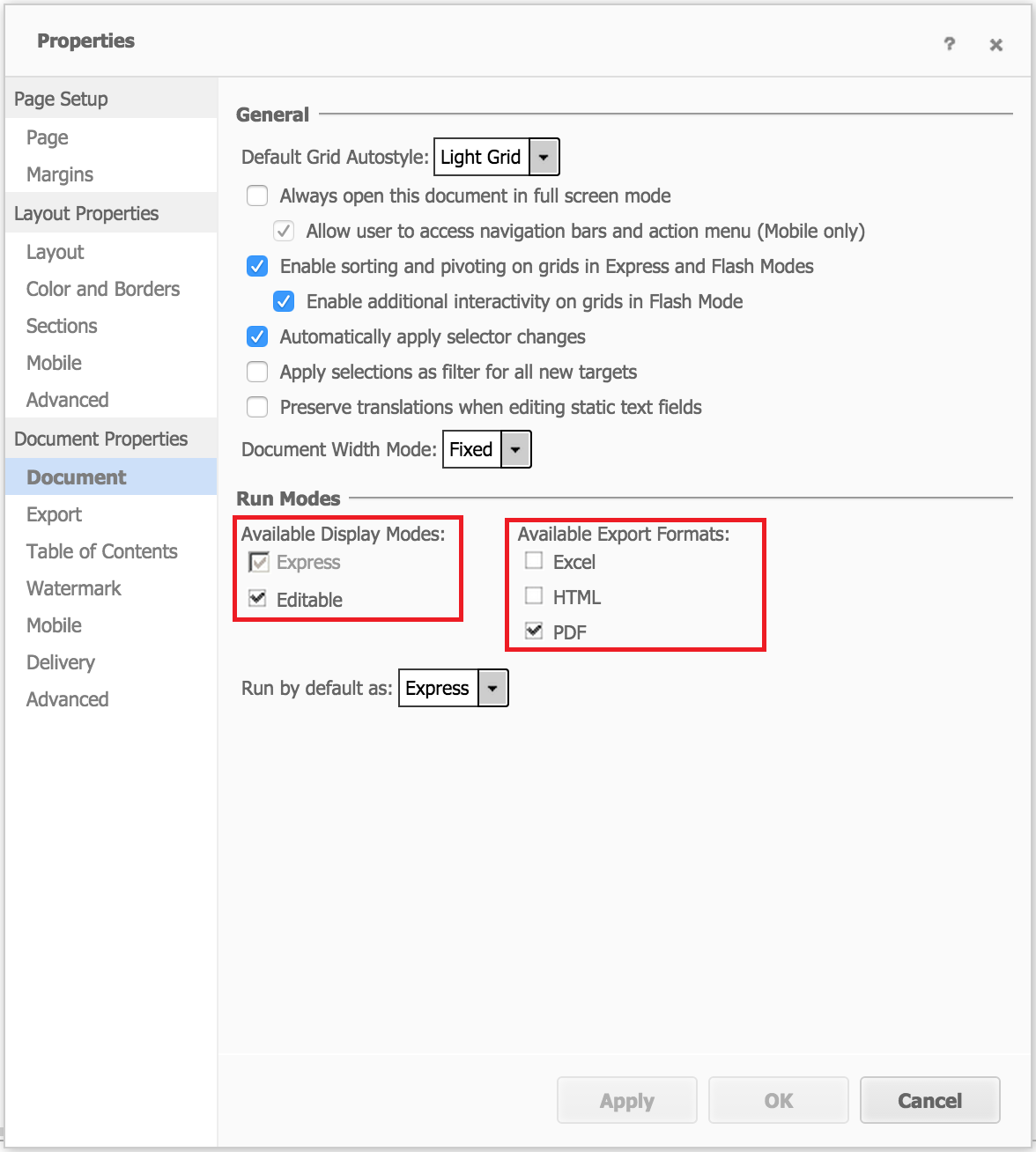
In Strategy Web, Interactive mode and Flash mode are not available as display modes and Flash mode is not available as export formats in Document Properties.
 

Steps to reproduce

  • Login to Strategy Web
  • Create a new empty document and from Design Mode go to Tools > Document Properties > Document > Run Modes
  • NOTE: Interactive and Flash modes are no longer displayed as options for 'Available Display Modes'. And Flash is no longer displayed as an option for 'Available Export Formats", as shown below:
ka04W000001488LQAQ_0EM4400000025bF.jpeg

Cause

This is by design behavior as Strategy Web is deprecating Interactive Mode and Flash Mode.
 

Action

Take advantage of Express Mode and Visual Insight.


Comment

0 comments

Details

Knowledge Article

Published:

May 29, 2017

Last Updated:

May 29, 2017