EducationSoftwareStrategy.com
StrategyCommunity

Knowledge Base

Product

Community

Knowledge Base

TopicsBrowse ArticlesDeveloper Zone

Product

Download SoftwareProduct DocumentationSecurity Hub

Education

Tutorial VideosSolution GalleryEducation courses

Community

GuidelinesGrandmastersEvents
x_social-icon_white.svglinkedin_social-icon_white.svg
Strategy logoCommunity

© Strategy Inc. All Rights Reserved.

LegalTerms of UsePrivacy Policy
  1. Home
  2. Topics

KB257502: New in MicroStrategy 10.1 - Interactive and Flash document view modes deprecated


Community Admin

• Strategy


With the release of Strategy 10.1, the simplification process of available report services document view modes has been initiated. Interactive and Flash view modes are being deprecated, making Express view mode the only available view mode for upcoming Strategy releases.
With this change, the existing Express mode has been upgraded to Presentation mode. Users are encouraged to use Presentation mode as the runtime mode for existing and new documents, because it utilizes HTML5 technology, has enhanced performance and a cleaner visual look compared to deprecated Interactive and Flash modes.
 

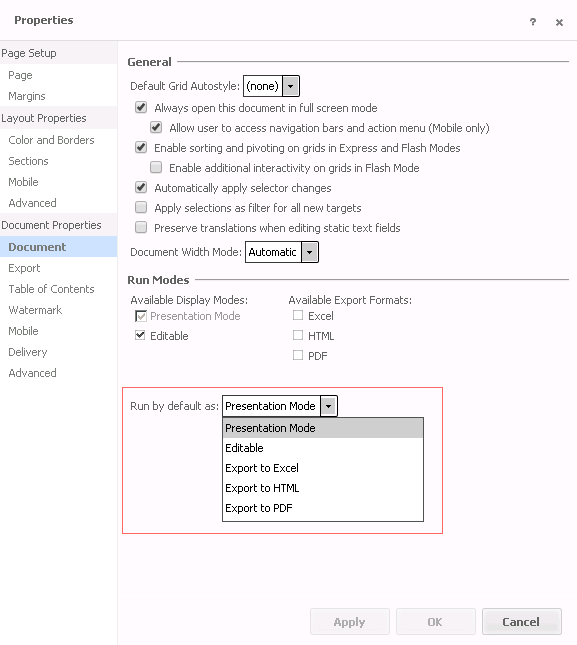
  • Newly created documents using Strategy Web 10.1 only allow Presentation mode as runtime mode. 
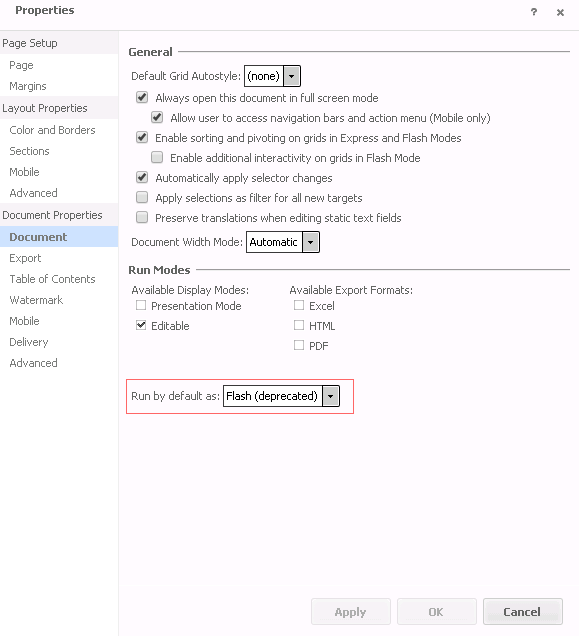
  • For any existing document that is configured with Interactive or Flash mode as default execution mode, Interactive or Flash mode remain the default run mode. In the document properties, the "Run as default" value will be renamed to "Interactive (deprecated)" or "Flash (deprecated) respectively.

ka04W00000147qMQAQ_0EM4400000025cI.jpeg
  • Important note: Due to a known issue with Strategy Web 10.1, documents set to Interactive mode as default view mode do not show "Interactive (Deprecated)" but "Flash (deprecated)" instead. This issue is currently under review and a fix is being reviewed for Strategy Web 10.1 Hotfix 1.

     
  • If users expand this dropdown box and pick any other options than "Interactive (deprecated)" or "Flash (deprecated)" and apply this change, none of the deprecated view modes will be available if this document is saved and reopened. 

ka04W00000147qMQAQ_0EM4400000025cD.jpeg
  • Using Strategy Developer, the deprecated Interactive or Flash mode can be enabled as default view mode for existing and new documents. For future releases, the development of features and enhancements will be focused on Presentation mode and support for deprecated view modes will be limited. Therefore it is recommended creating documents for Presentation mode.


Comment

0 comments

Details

Knowledge Article

Published:

March 29, 2017

Last Updated:

March 29, 2017