EducationSoftwareStrategy.com
StrategyCommunity

Knowledge Base

Product

Community

Knowledge Base

TopicsBrowse ArticlesDeveloper Zone

Product

Download SoftwareProduct DocumentationSecurity Hub

Education

Tutorial VideosSolution GalleryEducation courses

Community

GuidelinesGrandmastersEvents
x_social-icon_white.svglinkedin_social-icon_white.svg
Strategy logoCommunity

© Strategy Inc. All Rights Reserved.

LegalTerms of UsePrivacy Policy
  1. Home
  2. Topics

KB258482: New in MicroStrategy 10 Secure Enterprise Platform - Setting to Force Internet Explorer out of Compatibility Mode


Community Admin

• Strategy


In MicroStrategy 10 Secure Enterprise Platform, a new setting has been introduced that forces Internet Explorer 8 and above to render MicroStrategy Web in edge mode instead of compatibility mode. Edge mode refers to the latest available document rendering mode of the used Internet Explorer version.

In Strategy 10 Secure Enterprise Platform, a new setting has been introduced that forces Internet Explorer 8 and above to render Strategy Web in edge mode instead of compatibility mode. Edge mode refers to the latest available document rendering mode of the used Internet Explorer version.
 
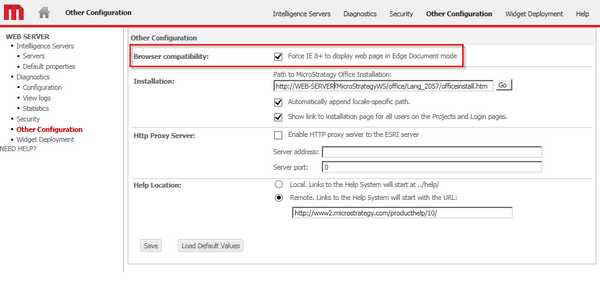
In order to enable the setting, go to the Web Administrator page > Other Configuration > Browser Compatibility and enable the setting "Force IE8+ to display web pages in Edge Document mode".
 

ka04W00000148GPQAY_0EM4400000025cN.jpeg


Force IE8+ to display web pages in Edge Document mode


For the Strategy Support policy regarding Internet Explorer Compatiblity Mode, please refer to KB43020: Is Internet Explorer in Compatibility View Mode supported for MicroStrategy Web 9.x?


Comment

0 comments

Details

Knowledge Article

Published:

April 3, 2017

Last Updated:

April 3, 2017