EducationSoftwareStrategy.com
StrategyCommunity

Knowledge Base

Product

Community

Knowledge Base

TopicsBrowse ArticlesDeveloper Zone

Product

Download SoftwareProduct DocumentationSecurity Hub

Education

Tutorial VideosSolution GalleryEducation courses

Community

GuidelinesGrandmastersEvents
x_social-icon_white.svglinkedin_social-icon_white.svg
Strategy logoCommunity

© Strategy Inc. All Rights Reserved.

LegalTerms of UsePrivacy Policy
  1. Home
  2. Topics

KB258654: Users are not able to edit the report services document in MicroStrategy Developer 10.0 after removing Dynamic Condition from the document grid


MSTR Admin1

•


After removing Dynamic Condition from the document grid, users continue getting the following error message on Android devices against MicroStrategy 10.0 Android.

SYMPTOM:
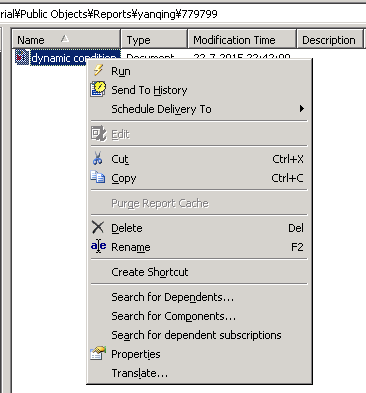
After removing Dynamic Condition from the document grid, users continue getting the following error message on Android devices against Strategy 10.0 Android. The Edit function for the report services document is not available in Strategy Developer afterwards.
“Document cannot be executed since it has features that are not supported in this version of the client.”
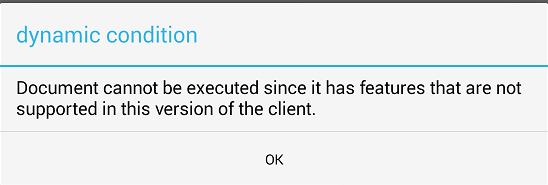
ka02R000000kce7QAA_0EM4400000029xm.jpeg

 
STEPS TO REPRODUCE: 

  • Configure Dynamic Condition for a grid in the report services document.
  • Run the report services document on Android against Strategy 10.0 Android. The above mentioned error message will be returned.
  • The error message remains on Android after removing the dynamic condition from the grid.
  • Go to Strategy Developer and the Edit option is greyed out.
ka02R000000kce7QAA_0EM4400000029xh.jpeg

CAUSE:
This is a known issue of Strategy 10.0, this issue has been fixed in Strategy 10.4 
 
ACTION:
Upgrade to Strategy 10.4 to take advantage of the issue fix.


Comment

0 comments

Details

Knowledge Article

Published:

April 7, 2017

Last Updated:

April 7, 2017