EducationSoftwareStrategy.com
StrategyCommunity

Knowledge Base

Product

Community

Knowledge Base

TopicsBrowse ArticlesDeveloper Zone

Product

Download SoftwareProduct DocumentationSecurity Hub

Education

Tutorial VideosSolution GalleryEducation courses

Community

GuidelinesGrandmastersEvents
x_social-icon_white.svglinkedin_social-icon_white.svg
Strategy logoCommunity

© Strategy Inc. All Rights Reserved.

LegalTerms of UsePrivacy Policy
  1. Home
  2. Topics

KB259082: How to find the build number of a MicroStrategy.war file without deploying it


Community Admin

• Strategy


How to find the build number of a MicroStrategy.war file without deploying it.

Strategy Web J2EE is provided as a Strategy.war file. The naming of the .war file is identical for each release.
When the .war file has been deployed on a supported application server, the version / build number of the .war file can be retrieved from the Strategy Web About page:
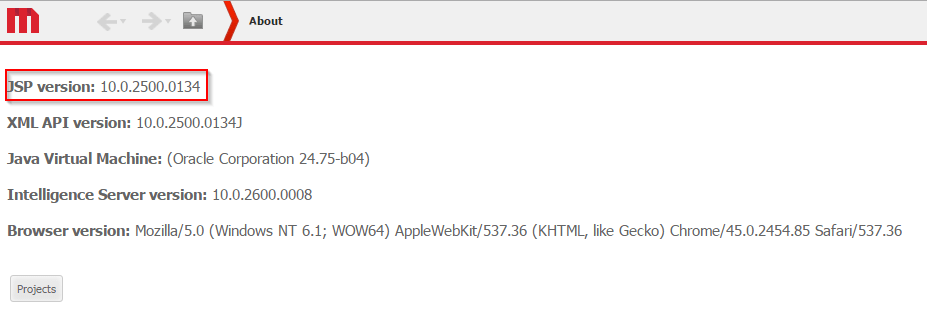
ka04W00000148OTQAY_0EM4400000025be.jpeg

In order to find the build number without deploying the .war file, the following steps should be followed:
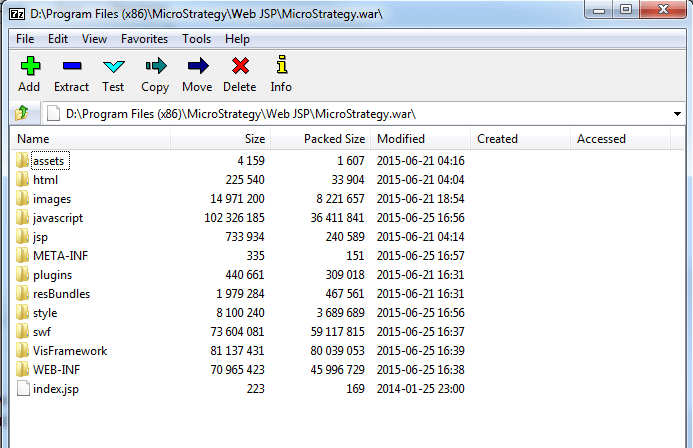
  • Navigate to the Strategy.war file. By default the installation location on Windows is "C:\Program Files (x86)\MicroStrategy\Web JSP".
  • Open Strategy.war with 7-Zip or WinRAR in order to see the content.
ka04W00000148OTQAY_0EM4400000025bY.jpeg
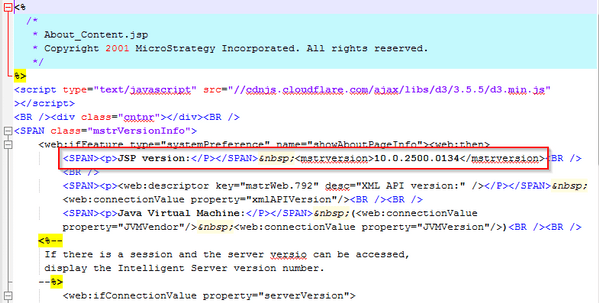
  • Navigate to jsp folder and open "About_Content.jsp". The build number of the .war file is hardcoded under JSP Version:
ka04W00000148OTQAY_0EM4400000025bc.jpeg


Comment

0 comments

Details

Knowledge Article

Published:

June 2, 2017

Last Updated:

June 2, 2017