EducationSoftwareStrategy.com
StrategyCommunity

Knowledge Base

Product

Community

Knowledge Base

TopicsBrowse ArticlesDeveloper Zone

Product

Download SoftwareProduct DocumentationSecurity Hub

Education

Tutorial VideosSolution GalleryEducation courses

Community

GuidelinesGrandmastersEvents
x_social-icon_white.svglinkedin_social-icon_white.svg
Strategy logoCommunity

© Strategy Inc. All Rights Reserved.

LegalTerms of UsePrivacy Policy
  1. Home
  2. Topics

KB259235: The "Match" option for multiple conditions is applied as "All selections" instead of "Any selection" for hierarchy prompt, even when “Default operator between conditions” has been set to “Or” for MicroStrategy Web


Community Admin

• Strategy


The "Match" option for multiple conditions is applied as "All selections" instead of "Any selection" for hierarchy prompt, even when “Default operator between conditions” has been set to “Or” for MicroStrategy Web

SYMPTOM:
The "Match" option for multiple conditions is applied as "All selections" instead of "Any selection" for hierarchy prompt, even when “Default operator between conditions” has been set to “Or” for Strategy Web.
Follow the steps below to reproduce the issue:
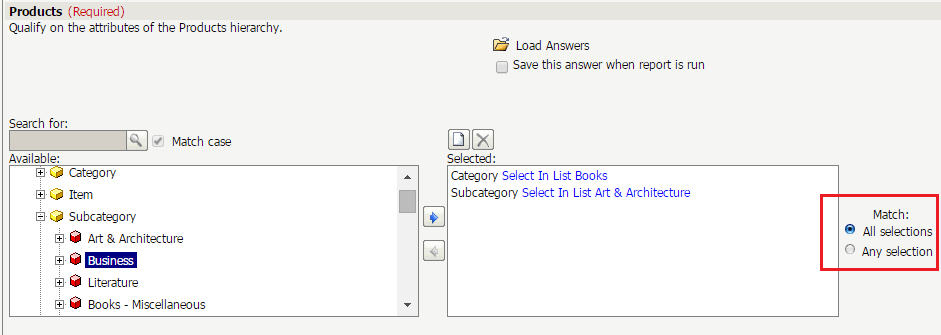
  1. Create a hierarchy prompt on Products. Set "personal answers allowed" to Multiple and in Web options, set "Default operator between conditions" to "Or"
  2. Create a report with above prompt
  3. Run ther report in Web. In below scenario, the "Match" option for multiple condition is applied as "All selections" instead of "Any selection"(as option in Step 1 is set "Or", the behavior of "any selection" is expected):
    • Previously saved personal answers is loaded
    • In above personal answer, only one condition is saved
ka04W000000OggrQAC_0EM4400000025b9.jpeg

Namely, if the personal answer is not allowed or loaded, or if more than one condition is saved in personal answer, the "any selection" behavior is kept.
CAUSE:
This is a known issue with Strategy Web.
ACTION:
Currently this issue is still being reviewed for feasibility by our Technology team and it is not scoped for any upcoming scheduled Strategy release.
The Strategy Internal Reference Number for the issue discussed in this technical note is DE23353.


Comment

0 comments

Details

Knowledge Article

Published:

June 13, 2017

Last Updated:

June 13, 2017