When executing a report services document in Strategy Web, images are not being rendered when using relative paths as follows:
However, images are displayed when using a relative path as follows:
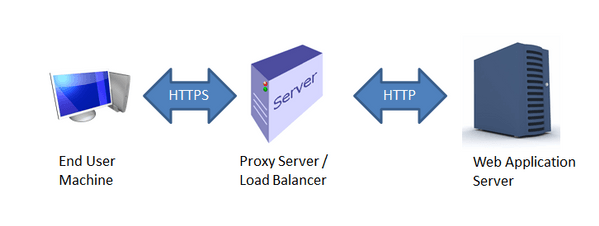
The issue affects environments that have a proxy or load balancer setup which uses following setup:
[1] HTTPS (secure) from Client Machine
[2] Proxy / Load balancer in the middle
[3] HTTP (non-secure) for the backend Web Server communication.
eg- Client Machine --> HTTPS --> Load Balancer / Proxy --> HTTP --> Web Server
Strategy Web JSP resolves relative paths based on the syntax used to include the image.
For example, the relative path images/file.png will resolve the HTTPS request to retrieve the image to https://MACHINE/MicroStrategy/servlet/images/file.png.
The location .../servlet/images/file.png does not exist. An incoming request to /servlet/images/file.png will be redirected to the right location which would be https://MACHINE/MicroStrategy/images/file.png.
This works correctly if the schema used for communication between end user machine, the proxy, and the backend Web Server is HTTPS (secure) consistently for all communication. Strategy Web reads the schema used for the incoming request and generates the redirect URL using the same schema, i.e. HTTPS.
If communication between the proxy and the web server uses HTTP, then the redirect URL will be:
http://MACHINE:80/MicroStrategy/images/file.png
instead of:
https://MACHINE/MicroStrategy/images/file.png
Note, the difference in the schema from 'http' to 'https'
In consequence, the client machine attempts to access the image using HTTP instead of HTTPS going through the proxy which, in most cases will have been prevented on proxy configuration.
The relative path ../images/file.png works since it resolves directly to the correct location, i.e. https://MACHINE/MicroStrategy/images/file.png without the need to re-direct since the servlet context is removed due to "../".
There are two ways to resolve this issue:
1. Force Strategy Web to return redirect URLs for images using HTTPS schema instead of HTTP even if the incoming request uses HTTP. To do so, the following steps must be followed:
a. In Strategy, open "web.xml" from <PATH_TO_WEB_DEPLOYMENT>/WEB-INF
b. Change the mstrDocumentImages servlet from:
<servlet>
    <servlet-name>mstrDocumentImages</servlet-name>
    <servlet-class>com.Strategy.web.servlets.DocumentImageServlet</servlet-class>
</servlet>
<servlet>
    <servlet-name>mstrDocumentImages</servlet-name>
    <servlet-class>com.Strategy.web.servlets.DocumentImageServlet</servlet-class>
    <init-param>
        <param-name>scheme</param-name>
        <param-value>https</param-value>
   </init-param>
</servlet>