Resources such as images or javascript files can be hosted on external web servers and may still be used within customizations. Browsers commonly allow external resources to be loaded as part of a web page, although this may vary depending on individual browser security configuration.
The drawback in using externally hosted resources is that the time taken to load these resources could contribute to overall loading time in functions Strategy Web dependent on these.
An example of these is custom visualizations. These often require additional javascript libraries to function, and cannot be rendered until the javascript dependencies have fully loaded.
The plugin architecture can be use to host files and resources within a local plugin on the Web server as an alternative. After downloading these external resources and storing them within a plugin deployed with Strategy Web, these can then be referred to using a relative URL pointing to the specific resource within the plugin.
Storing these resources within the local network may reduce loading time if any functionality is dependent on them, and may also address issues with browsers potentially preventing external resources from loading due to tightened security settings or other factors.
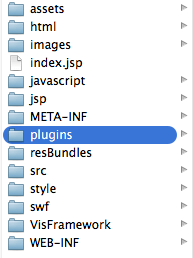
file://../plugins/_Resources/javascript/javascriptfile.js


file://../plugins/_Resources/images/myimage.png
The example provided in this document is provided “as-is” and user has read the following customization warning:
ADDITIONAL INFORMATION:
The Strategy SDK allows you to customize several Strategy products and extend and integrate the Strategy business intelligence functionality into other applications. However, before changing the way Strategy products look or behave, it is helpful to understand how the application is built. For more information regarding the Strategy products or the process of customizing Strategy products, please refer to MicroStrategy Developer Hub .
To access the Strategy Developer Hub, you must have access to the Strategy Knowledge Base, you must have purchased the Strategy SDK, and you must be current on your Strategy maintenance agreement. If you are a US-based business and believe that you satisfy all three of these conditions but you do not have access to the Strategy Developer Hub, please contact Strategy Technical Support at support@Strategy.com or at (703) 848-8700. If you are an international business, please contact Strategy Technical Support at the appropriate email address or phone number found at https://www.Strategy.com/us/services/support/contact.
CUSTOMIZATION WARNING:
This customization is provided as a convenience to Strategy users and is only directly applicable to the version stated. While this code may apply to other releases directly, Strategy Technical Support makes no guarantees that the code provided will apply to any future or previous builds. In the event of a code change in future builds, Strategy Technical Support makes no guarantee that an updated version of this particular customization will be provided. In the event of a code change in future builds, Strategy may not be able to provide additional code on this matter even though this customization is provided at this time for this specific build. For enhancements to this customization or to incorporate similar functionality into other versions, contact your Account Executive to inquire about Strategy Consulting assistance.
