EducationSoftwareStrategy.com
StrategyCommunity

Knowledge Base

Product

Community

Knowledge Base

TopicsBrowse ArticlesDeveloper Zone

Product

Download SoftwareProduct DocumentationSecurity Hub

Education

Tutorial VideosSolution GalleryEducation courses

Community

GuidelinesGrandmastersEvents
x_social-icon_white.svglinkedin_social-icon_white.svg
Strategy logoCommunity

© Strategy Inc. All Rights Reserved.

LegalTerms of UsePrivacy Policy
  1. Home
  2. Topics

KB261425: Error [Could not render WebGuiComponent „ft_pathBean” in page “report”, it was not found] is shown on footer path during report in MicroStrategy Web 10.1


Community Admin

• Strategy


Error [Could not render WebGuiComponent „ft_pathBean” in page “report”, it was not found] is shown on footer path during report in MicroStrategy Web 10.1

SYMPTOM:
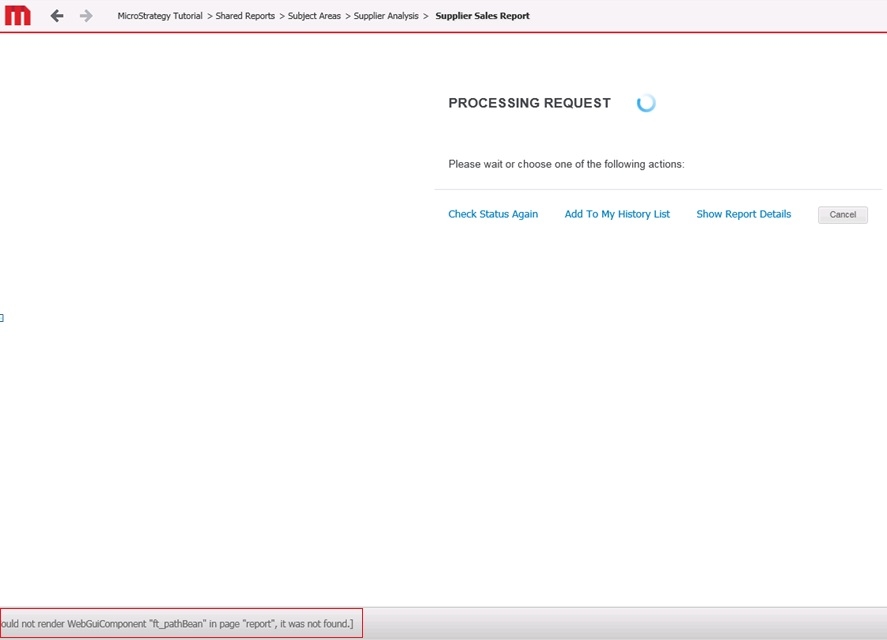
In Strategy Web 10.1 the error [Could not render WebGuiComponent „ft_pathBean” in page “report”, it was not found] on footer path when wait page opens during report execution.
 
STEPS TO REPRODUCE:

  • In Strategy Web log into Strategy Tutorial Project
  • Under Web preferences go to User Preferences > Folder Browsing and enable the option "Show footer path", see also picture below:
ka04W000001IvA9QAK_0EM440000002JXn.png
  • Save the changes
  • Execute the report "Supplier Sales Report" located under Shared Reports > Subject Areas > Supplier Analysis
  • As shown in the screenshot, during execution the wait page occurs and the error message is seen in the footer path:
ka04W000001IvA9QAK_0EM4400000025aJ.jpeg

 
CAUSE:
This is a known issue in Strategy Web 10.1.
 
ACTION:
This issue has been addressed with Strategy 10.2. Upgrade to take advantage of the fix.
 
WORKAROUND:
For user in 10.1, take below workaround:
1. Navigate to <Strategy Web Path>\WEB-INF\xml;
2. Open pageConfig.xml in Notepad or other editor;
3. Search for the following line:
    ASP:


<template XMLmerge_id="2" error-desc="" error-title-id="mstrWeb.1167" file-name="Wait.aspx" status="com.Strategy.web.beans.EnumRequestStatus.WebBeanRequestProcessing">

 
   JSP:

<template XMLmerge_id="2" error-desc="" error-title-id="mstrWeb.1167" file-name="/jsp/Wait.jsp" status="com.Strategy.web.beans.EnumRequestStatus.WebBeanRequestProcessing">

4. Insert the below line into <web-components> node, which are about 7 lines below above line in step3.

<web-component base-bean="pathBean" feature-id="" name="ft_pathBean" style-name="FooterPathStyle" style-type="catalog" />

5. Save the changes and restart web server. 


Comment

0 comments

Details

Knowledge Article

Published:

April 14, 2017

Last Updated:

April 14, 2017