EducationSoftwareStrategy.com
StrategyCommunity

Knowledge Base

Product

Community

Knowledge Base

TopicsBrowse ArticlesDeveloper Zone

Product

Download SoftwareProduct DocumentationSecurity Hub

Education

Tutorial VideosSolution GalleryEducation courses

Community

GuidelinesGrandmastersEvents
x_social-icon_white.svglinkedin_social-icon_white.svg
Strategy logoCommunity

© Strategy Inc. All Rights Reserved.

LegalTerms of UsePrivacy Policy
  1. Home
  2. Topics

KB26144: Changes in Settings that require MicroStrategy Intelligence Server 2021 to be restarted


Community Admin

Placeholder •


Changes in Settings that require MicroStrategy Intelligence Server 10.x and 11.x to be restarted

The following article lists the settings that require Strategy Intelligence Server 2021 to be restarted in order for the changes to take effect.
 
Server-level settings
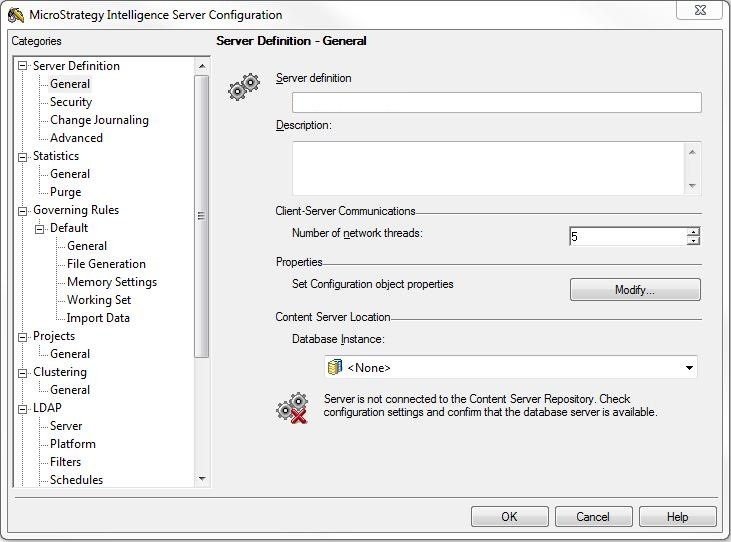
At the server level, only a few settings from each category need a server restart. These are outlined below:
 

ka0PW0000002yw9YAA_0EM440000002SUQ.jpeg

Server Definition
General

  • Number of network threads
  • Content Server Location Database Instance

Advanced

  • Backup Frequency
  • Cache lookup cleanup frequency (minutes)
  • Time to run license check (24 hr format)
  • Use Strategy Scheduler
  • Scheduler session time out
  • Enable Performance Monitoring

Statistics
General

  • Complete Session Logging
  • Single Instance Session Logging
  • Single Instance Session Logging Project Selection

Governing
Default
General

  • User session idle time
  • Web user session idle time

Memory Settings

  • Enable Web request job throttling
  • Maximum Intelligence Server use of total memory
  • Minimum machine free physical memory
  • Enable single memory allocation governing
  • Maximum single allocation size
  • Enable memory contract management
  • Minimum reserved memory (Mbytes)
  • Minimum reserved memory (%)
  • Maximum use of virtual address space
  • Memory request idle time (sec)

Working Set

  • Working Set file directory
  • Maximum RAM for working set cache (*Note 2)

Projects
General

  • Apply startup configuration on save (*Note 6)

History Settings
General

  • Maximum number of messages per user
  • Repository Type (Switch from File to Database Based)
  • History Directory
  • Database Instance

Project-level settings
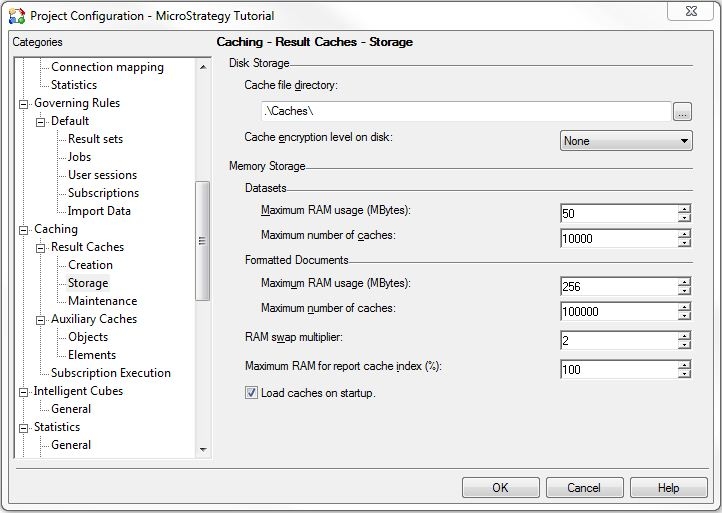
Only a few settings require a server restart for the changes to take effect. These are outlined below:
 

ka0PW0000002yw9YAA_0EM440000002SUK.jpeg

 
Database instances
Statistics

  • Statistics database instance

Caching
Result Caches

  • Cache File Directory
  • Cache encryption level on disk
  • Maximum RAM Usage (For both Datasets and Formatted Documents)
  • Maximum number of caches (For both Datasets and Formatted Documents)
  • RAM swap multiplier
  • Maximum RAM for report cache index 

Auxiliary Caches
Objects

  • Server -> Maximum RAM usage  

Element cache

  • Server -> Maximum RAM usage
  • Create element caches per passthrough login
  • Create caches per connection map

Intelligent Cubes
General

  • Intelligent Cube file directory
  • Maximum RAM usage
  • Maximum number of cubes
  • Create Intelligent Cubes by database connection
  • Load Intelligent Cubes on startup
  • Enabling or modifying Dynamic Sourcing options
     

Security filter
General

  • Creation of a security filter

Important Notes:

  1. Changes to a database instance or database connection do not require a restart of Strategy Intelligence Server 9.x. However, for the new settings to take effect, all cached connections (appearing in the Database Connection Monitor) must be disconnected. After a setting change, any cached database connections will continue to use the old settings.
  2. Increasing the 'Maximum RAM for Working Set cache' setting does not require Strategy Intelligence Server to be restarted. Only when the value is to be decreased is a restart required. This also applies to 'Maximum RAM usage' as well as 'Maximum number of caches' settings. (See KB7696: The ’Maximum number of caches’ setting for Report Caching in the Project Configuration does not take effect when its value is reduced in MicroStrategy Intelligence Server 8.x for additional details)
  3. When a setting is not a runtime setting, Strategy Desktop prompts users to restart Strategy Intelligence Server 9.x to effectively register the change.
  4. If changes are made to any objects in the Metadata from a 2-tier connection, those changes will not be reflected in any server connections unless the object cache in the server memory is updated. Restarting the server will clear the object cache and make the changes. Users can also purge the object cache manually, allowing new versions of objects to be retrieved from the metadata. Editing objects from within the 3-tier connection automates this process by keeping the updated version in memory.
  5. For project level settings that require a server restart, unloading and then reloading a project will not make project-level setting changes take effect.
  6. Apply startup configuration on save: This option allows changes to be reflected immediately across the cluster. If the check box is cleared, changes are saved on clicking OK, but are not put into effect until Intelligence Server is restarted.


KB26144


Comment

0 comments

Details

Knowledge Article

Published:

June 27, 2017

Last Updated:

August 12, 2024