EducationSoftwareStrategy.com
StrategyCommunity

Knowledge Base

Product

Community

Knowledge Base

TopicsBrowse ArticlesDeveloper Zone

Product

Download SoftwareProduct DocumentationSecurity Hub

Education

Tutorial VideosSolution GalleryEducation courses

Community

GuidelinesGrandmastersEvents
x_social-icon_white.svglinkedin_social-icon_white.svg
Strategy logoCommunity

© Strategy Inc. All Rights Reserved.

LegalTerms of UsePrivacy Policy
  1. Home
  2. Topics

KB261858: Special characters like ‘ and & are not displayed correctly in a selector in Express mode in MicroStrategy Web 10.0


Community Admin

• Strategy


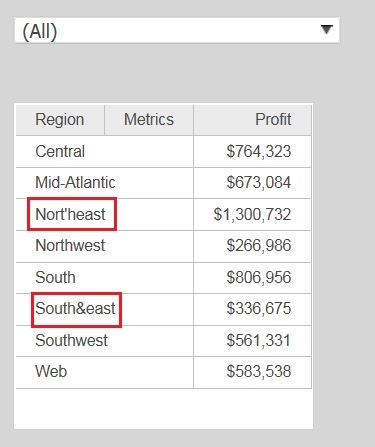
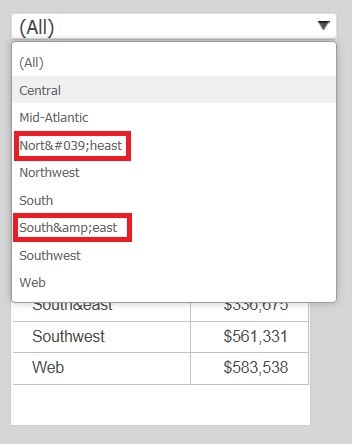
Special characters are not displayed correctly in the drop-down list of a selector in Express mode.
SYMPTOM:
Special characters are not displayed correctly in the drop-down list of a selector in Express mode.
 

ka04W000000OgmmQAC_0EM4400000025ZL.jpeg

" ‘ " is displayed as "'" and "&" is displayed as "&"
 

ka04W000000OgmmQAC_0EM4400000025ZN.jpeg

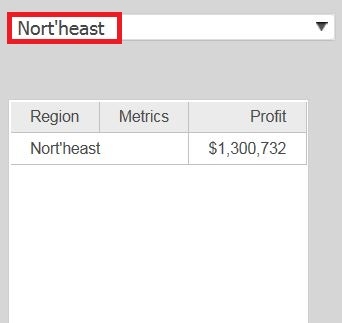
Once the value is selected it will then display correctly.
ka04W000000OgmmQAC_0EM4400000025ZR.jpeg

 
CAUSE:
This is a known issue in Strategy Web 10.0
 
ACTION:
This issue has been addressed in Strategy Web 10.1. Upgrade to this or a later version to take advantage of the fix.


Comment

0 comments

Details

Knowledge Article

Published:

June 9, 2017

Last Updated:

June 9, 2017